REFLECTION
Usability testing reinforced solving structural issues before visual refinement, as hierarchy and navigation mattered more than aesthetics early.
Prioritize structure before polish

Creating distinct flows for attendees and organizers helped me balance competing needs and design a clearer, more focused system.
Designing for different user roles

I learned that surfacing too much at once increases cognitive load, and that prioritization and reduction lead to clearer decision-making.
Less information leads to better decisions

With more time, I would test this solution in a live campus setting and measure registration-to-attendance conversion to validate its impact.
Impact needs real-world validation

Impact
Based on research and usability testing, this solution has the potential to:
Reduce time spent searching for relevant events
Lower missed events through reminders and scheduling visibility
Improve organizer planning through real-time attendance insights
Increase perceived value of events through built-in networking tools
Organizer Experience
Event Discovery & Registration
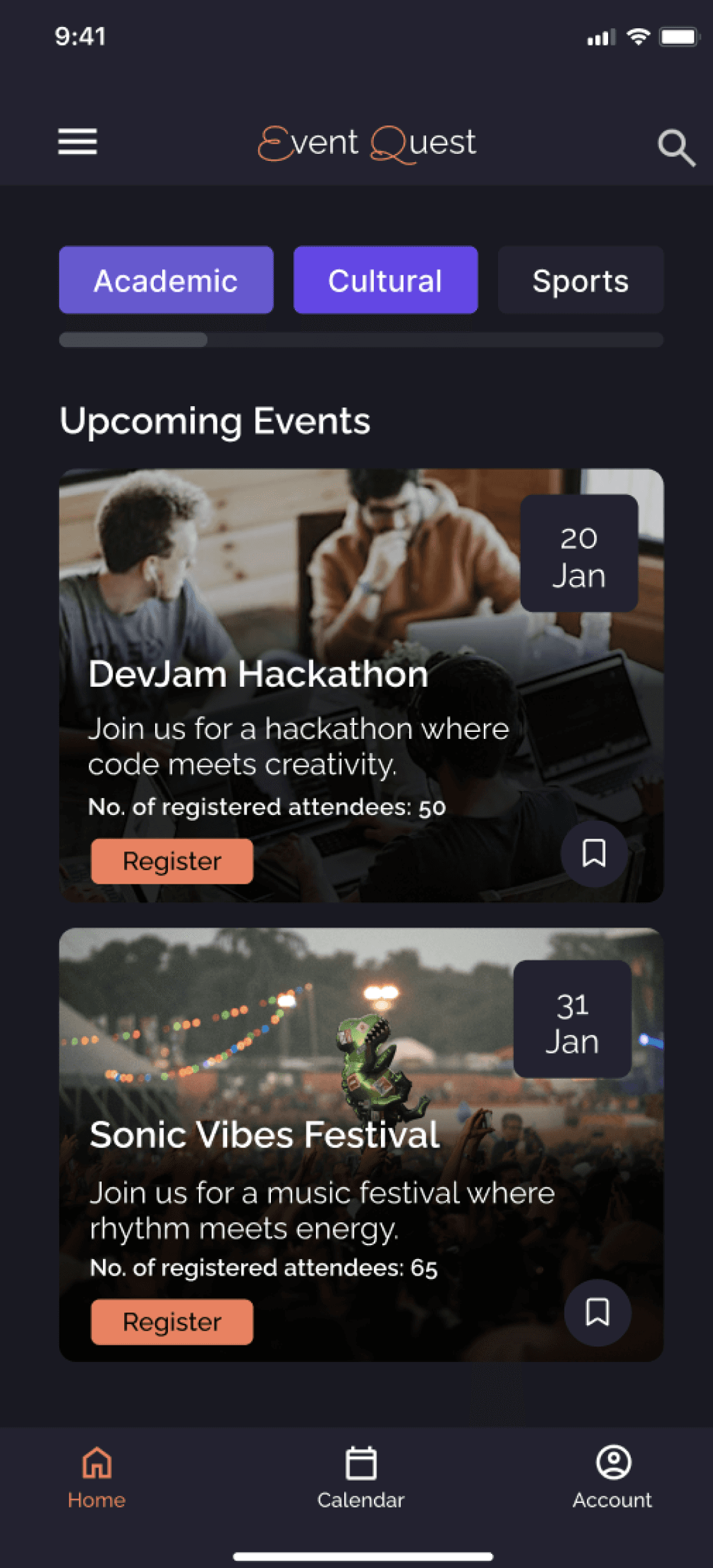
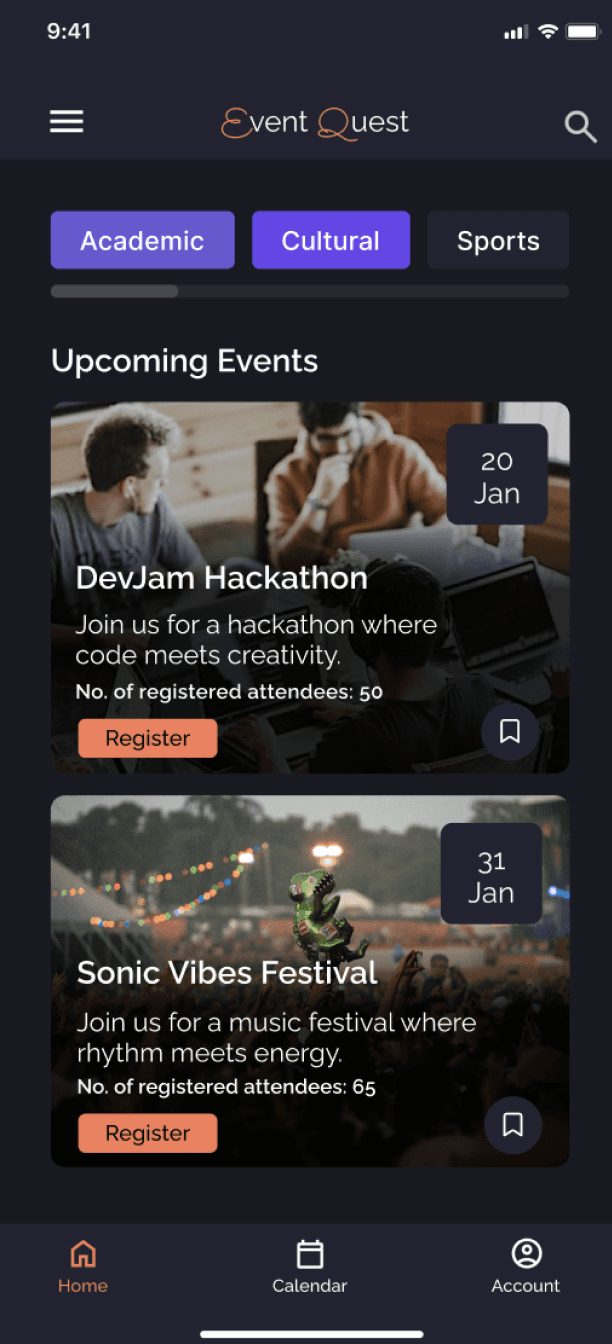
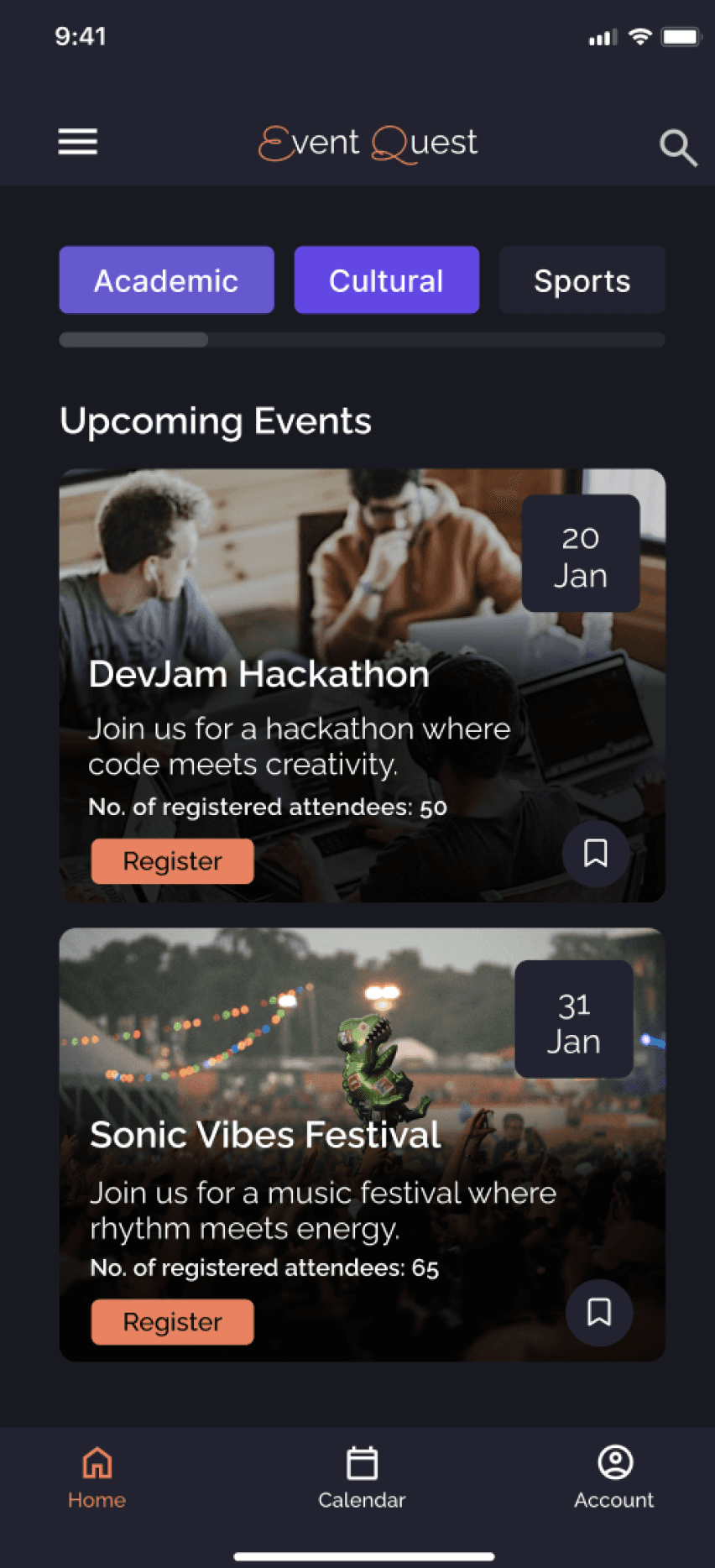
The event detail page prioritizes essential information and immediate registration to reduce hesitation and support commitment.
Calendar & Reminders
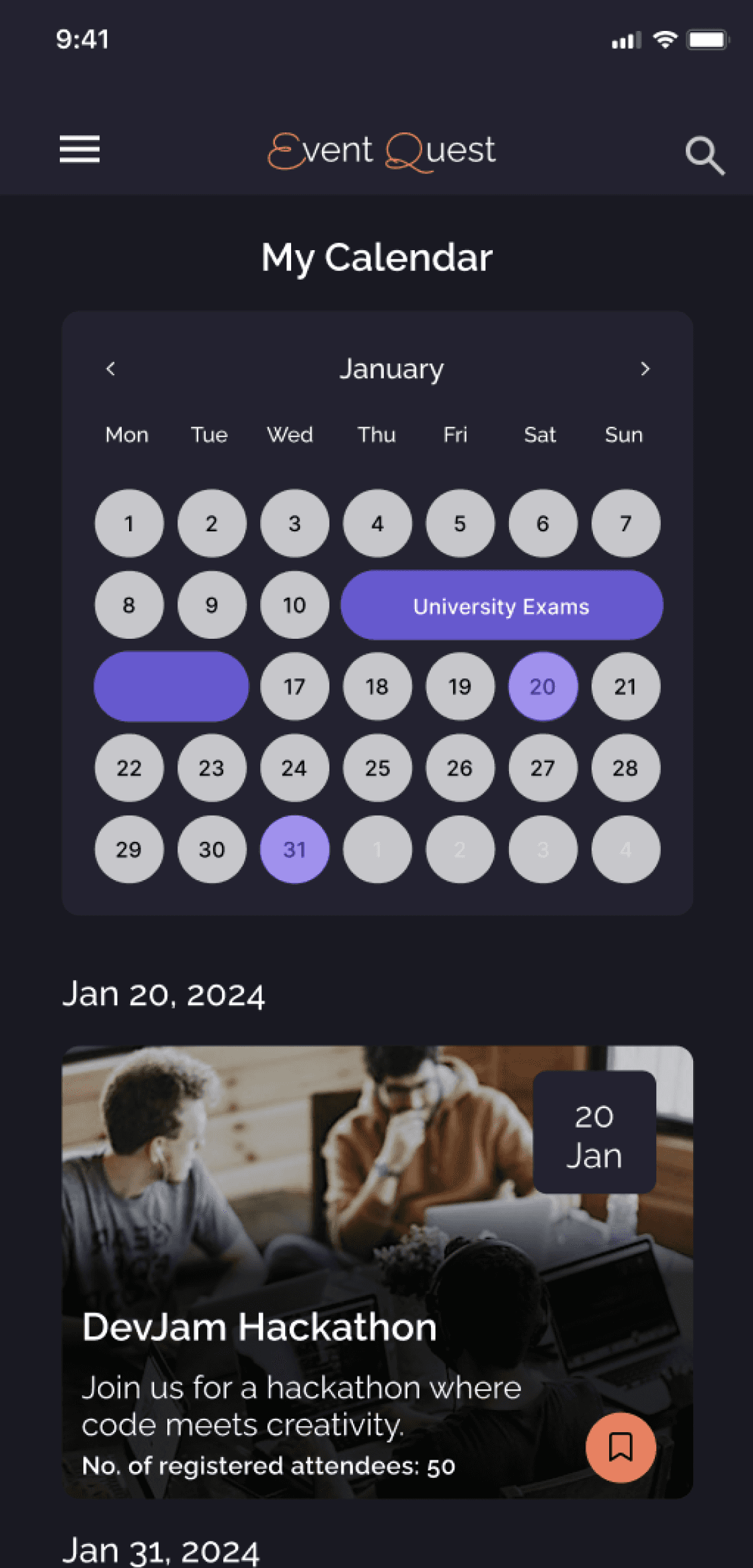
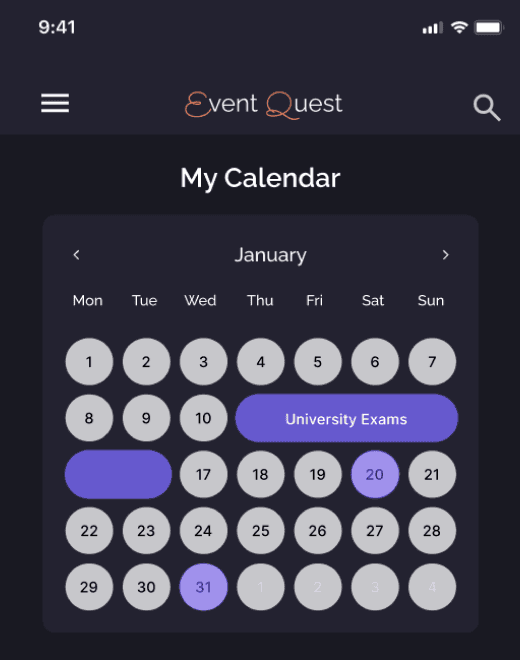
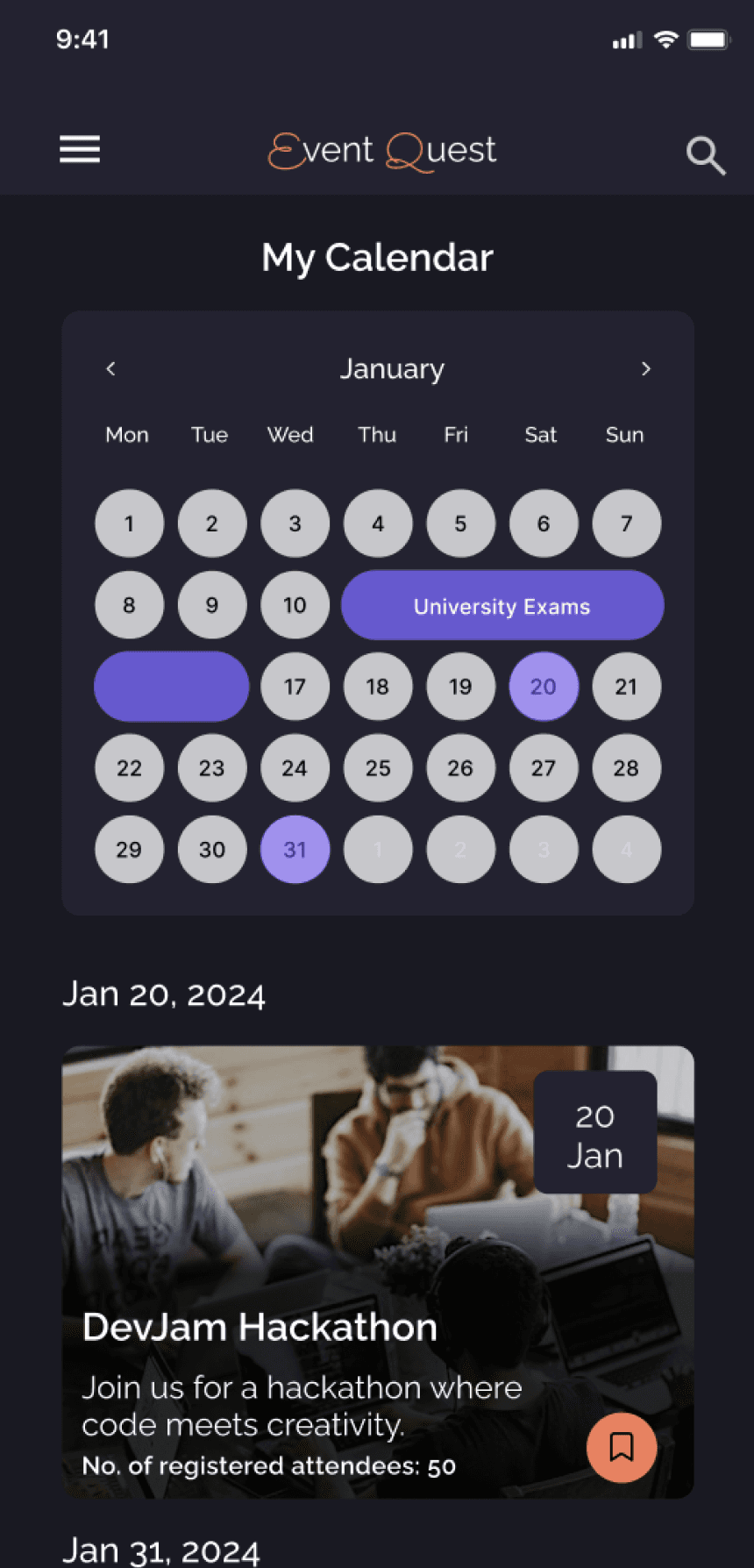
Events are synced with academic schedules to help students manage conflicts and reduce missed events.
Attendance Tracking
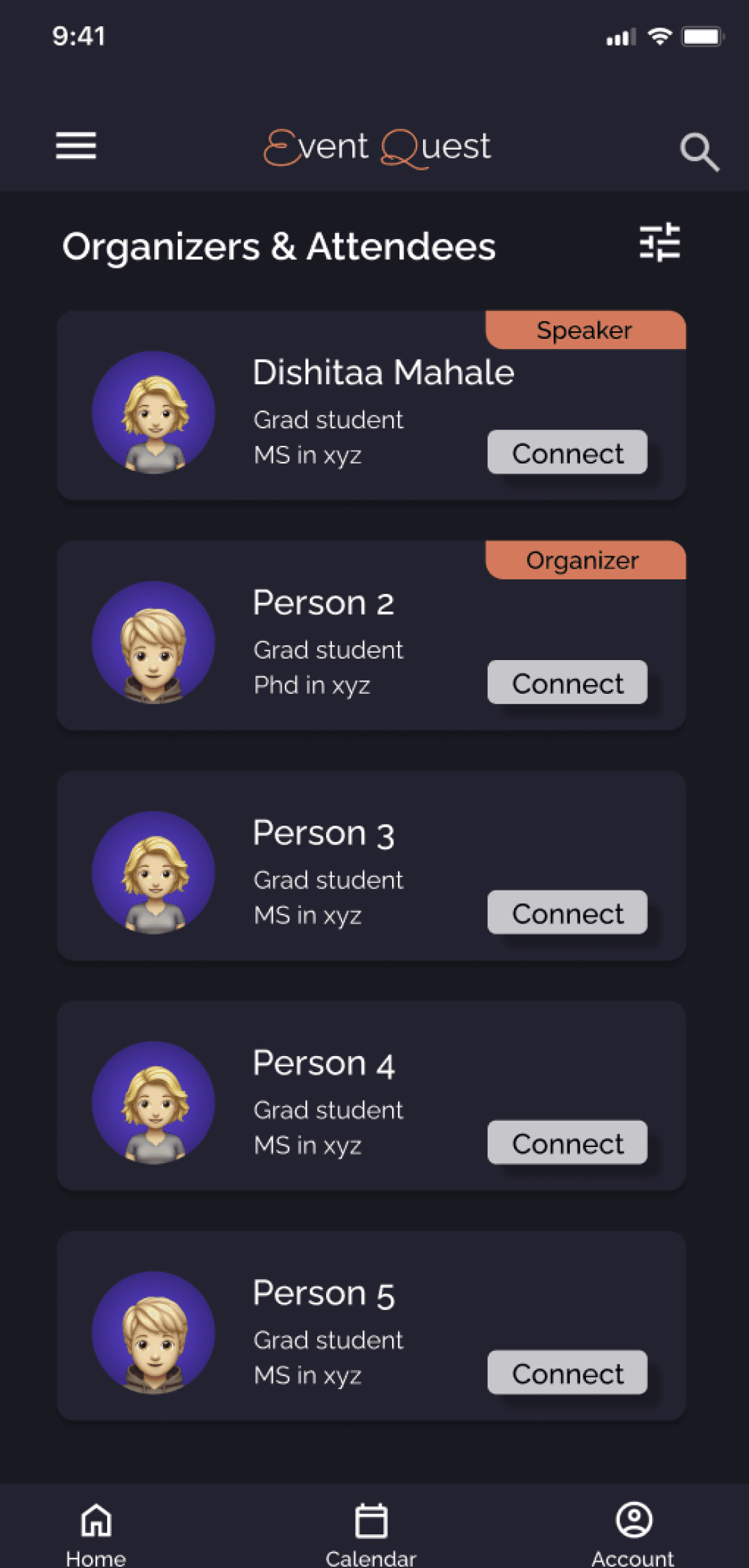
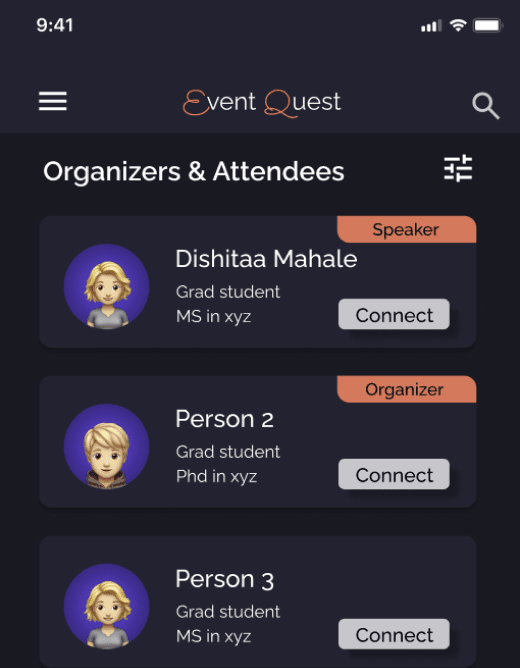
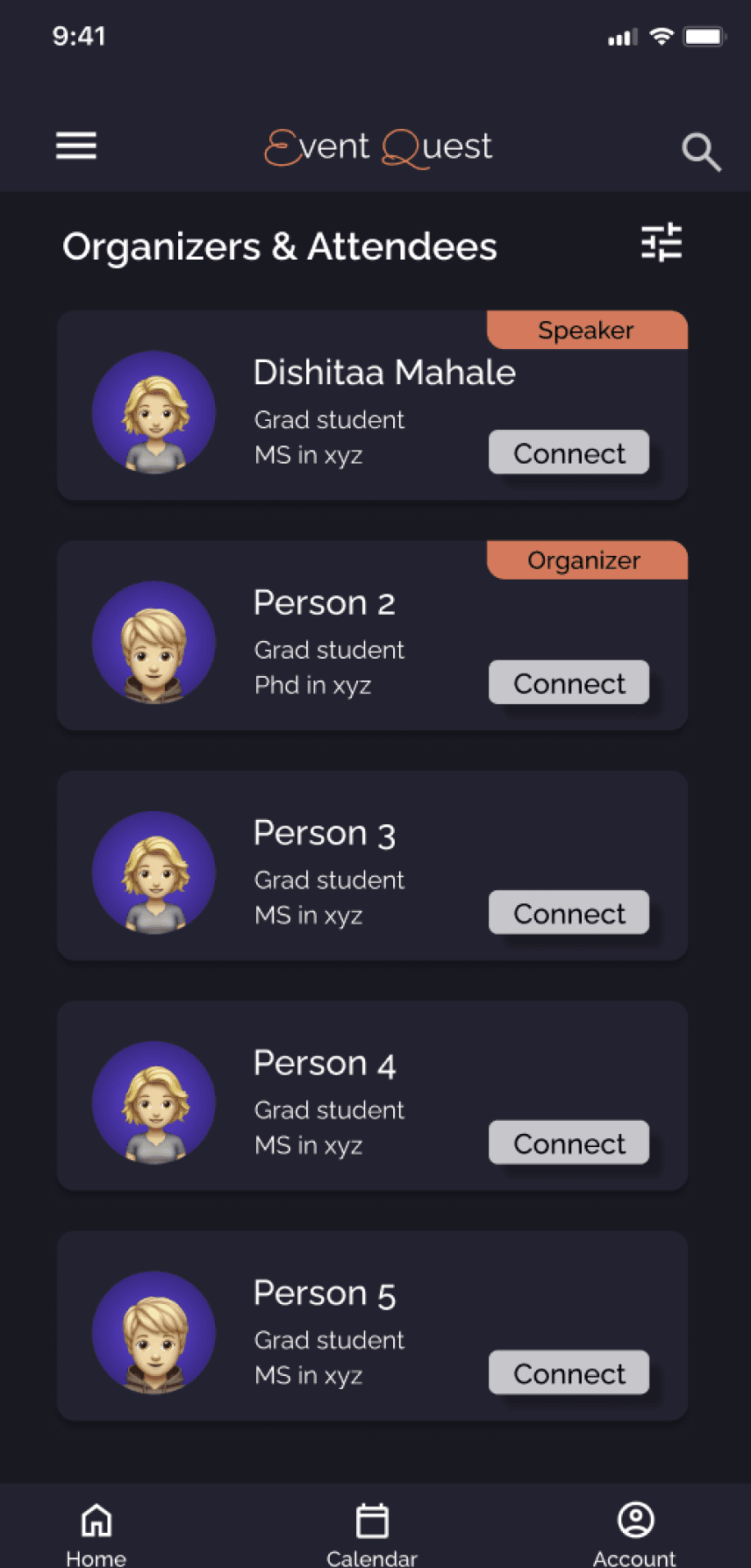
Real-time attendee tracking and QR-based check-in give organizers visibility and control on the event day.
FINAL SOLUTION
(Showcased key screens)
Attendee Experience
Scrollable sections went unnoticed
Redundant navigation items
Organizer confusion around tracking
Missing post-event connections
Added visual scroll indicators and spacing cues
Consolidated saved content under Accounts
Introduced event-level filtering and clearer labels
Added a connection option after event check-in
Usability Issue
Design Change
These insights directly informed the final visual design and interaction decisions shown below.
After defining the information architecture, low-fidelity prototypes were created to validate navigation clarity and task flow before investing in visual design. The goal was to identify structural issues early on.
Participants were asked to complete key tasks using the low-fidelity prototype while verbalizing their thought process. Observations focused on hesitation, confusion, misclicks, and unmet expectations.
Usability Testing Insights
Users wanted to connect with the organizer but were unable to find a way to do so.
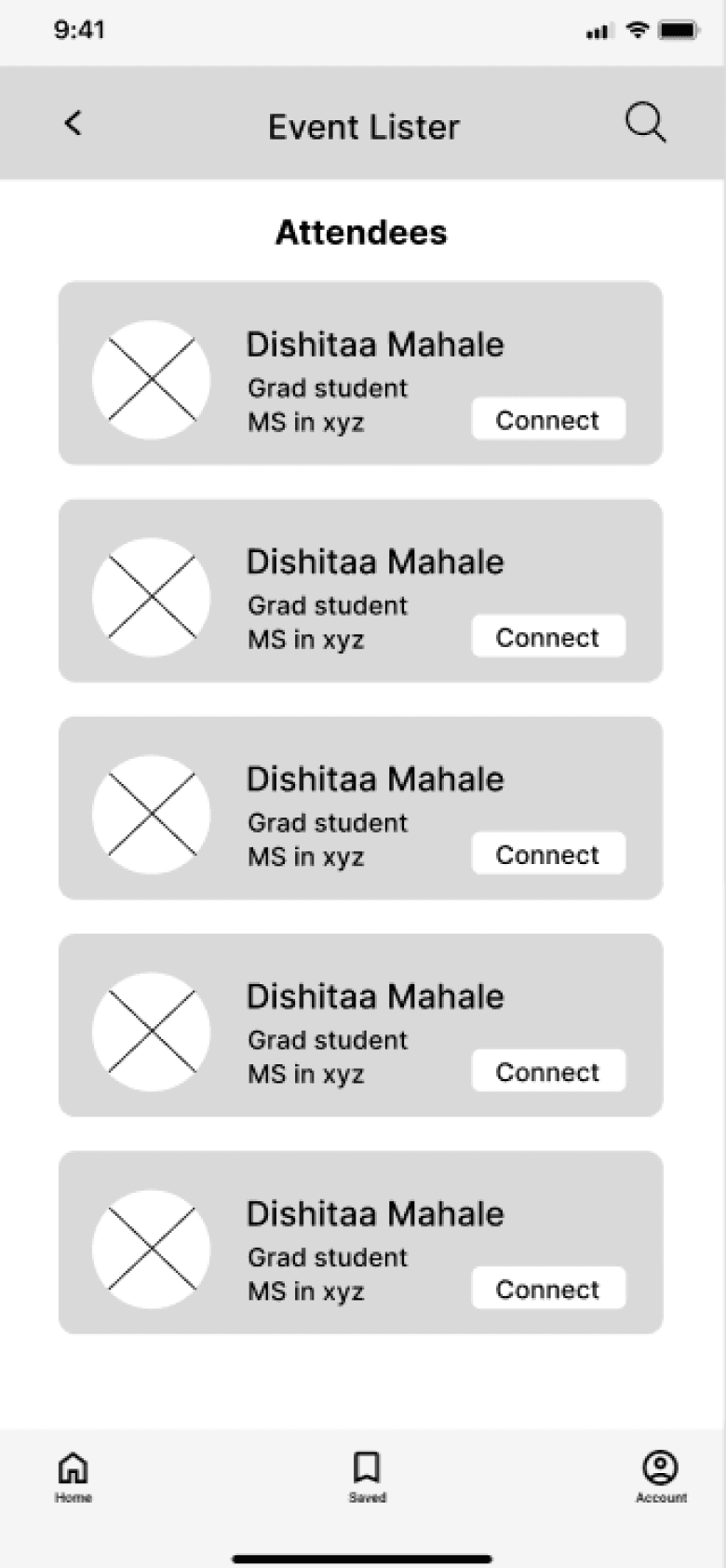
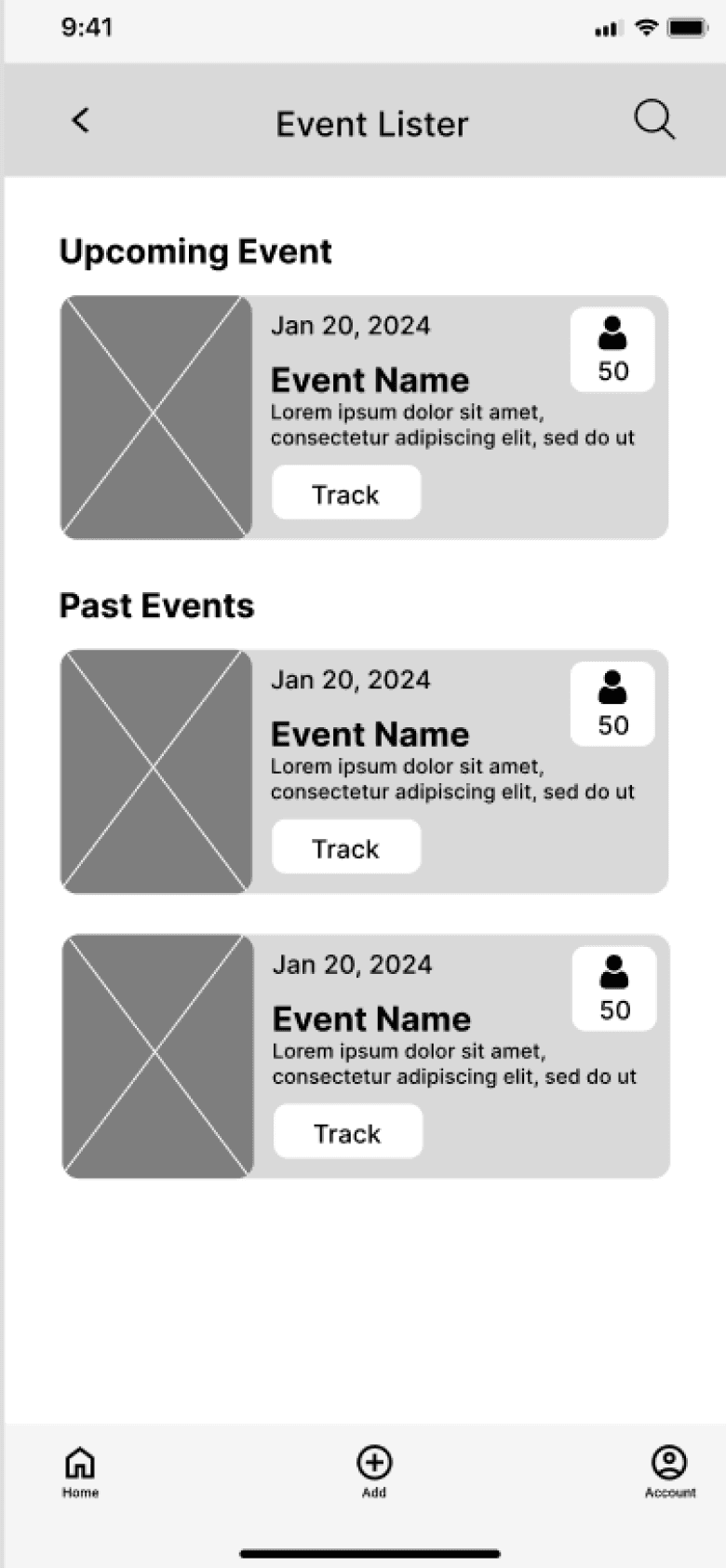
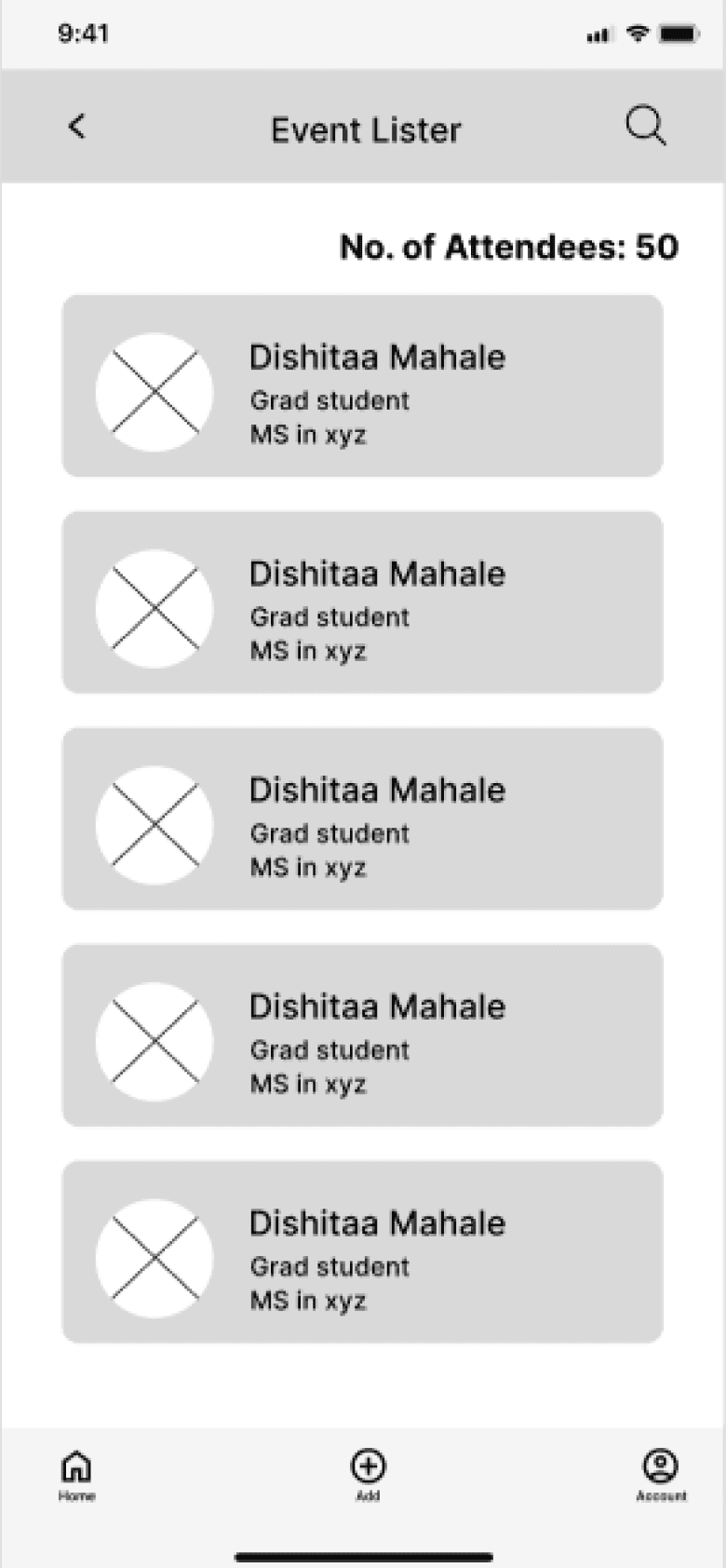
For organizers, having the same nav bar as attendees did not align with their needs.
Organizers found it difficult to understand which event they were tracking attendees for.
Users did not realize this section was scrollable.
After leaving this page, accessing the notes and network section became difficult.
Saved in nav bar felt redundant since it already existed in accounts.
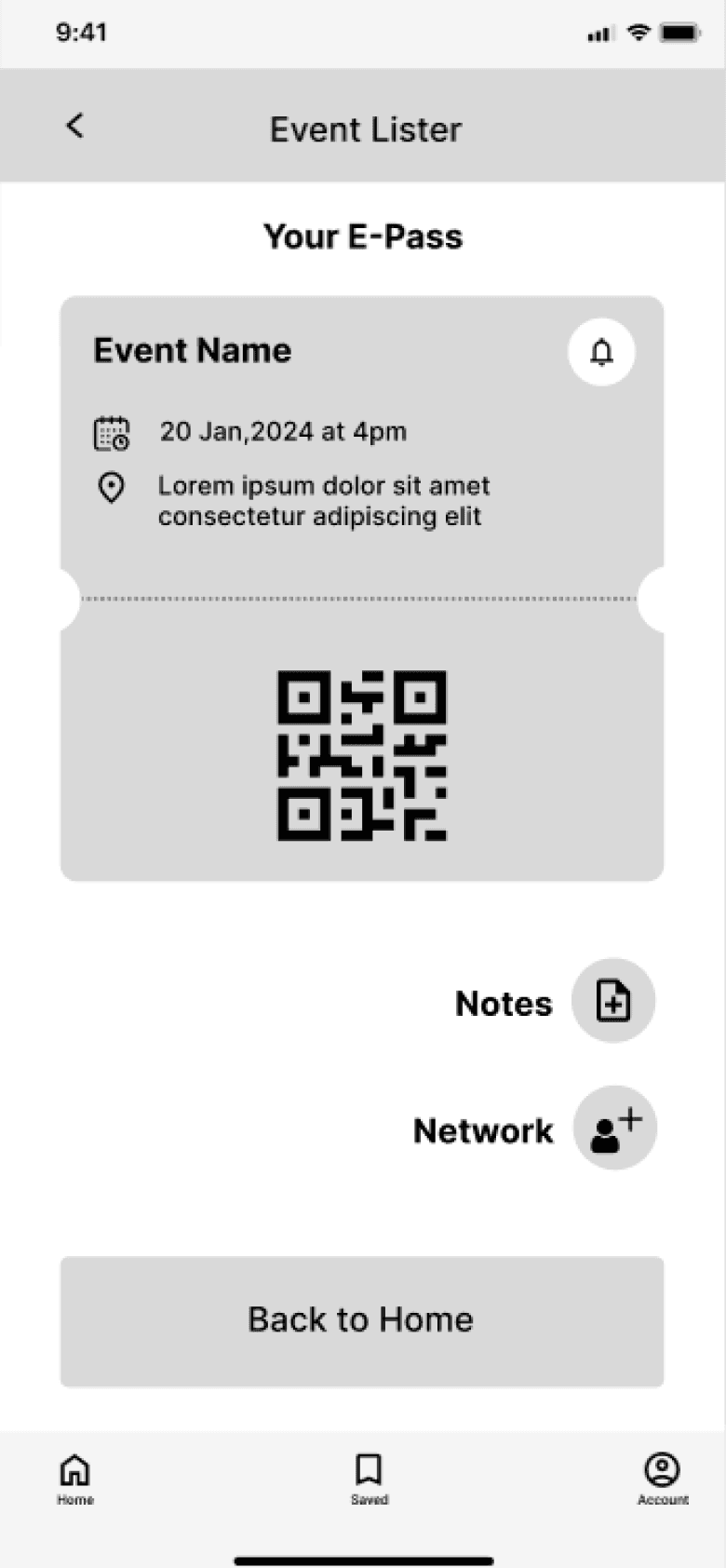
For Organizer
Login
Home
Track Attendees
Add Events
Event Creation Form
Calendar
Accounts
List of events organized
Track Attendees Button
List of attendees
Mark as Check-in Button
Select Event Category
Personal Information
Synced-up Calendar
Attendee and organizer paths were separated to align with different mental models.
For Attendee
Select Preferences
Login
Home
Event Details
E-pass
Event Connections
Notes
My Calendar
Accounts
Registered Events
My Tokens
Saved Events
Search
List of events
Date & Time
Location
Description
Organizers
Speakers
Reviews
Register Button
List of people connected with at an event.
Message
E-pass
Notify button
Synced-up Calendar
Personal Information
List of Registered Events
List of earned tokens
List of saved events
Notes List
Create Note
Event discovery and calendar access were placed in primary navigation to address fragmented discovery.
Registration and reminders live within event pages to support follow-through.
Registered events, saved events, and tokens were grouped to reduce cognitive load.
Fragmented discovery
Low follow-through
Cognitive overload
Conflicting user needs
Discovery + Calendar in primary nav
Registration embedded in event pages
Secondary features grouped
Separate attendee & organizer flows
Research Insight
IA Decision
How Research Informed the Information Architecture
DESIGN PRINCIPLES
Each design principle directly addresses recurring breakdowns observed during research:
Fragmented Discovery, Low Follow-through, and High Cognitive Load.
Bring discovery, reminders, and scheduling into one place.
Centralization over fragmentation
Design for follow-through, not just exploration.
Commitment over browsing
Reduce cognitive load through clear information and feedback.
Clarity over
complexity
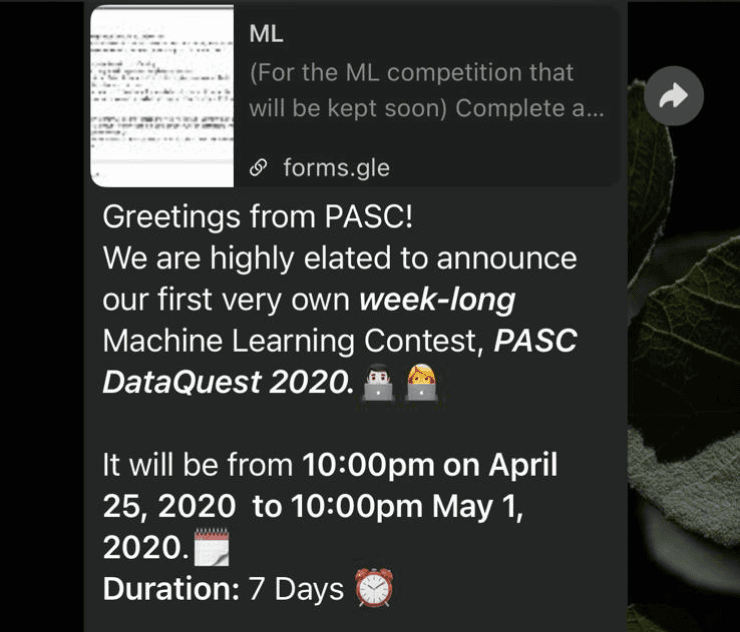

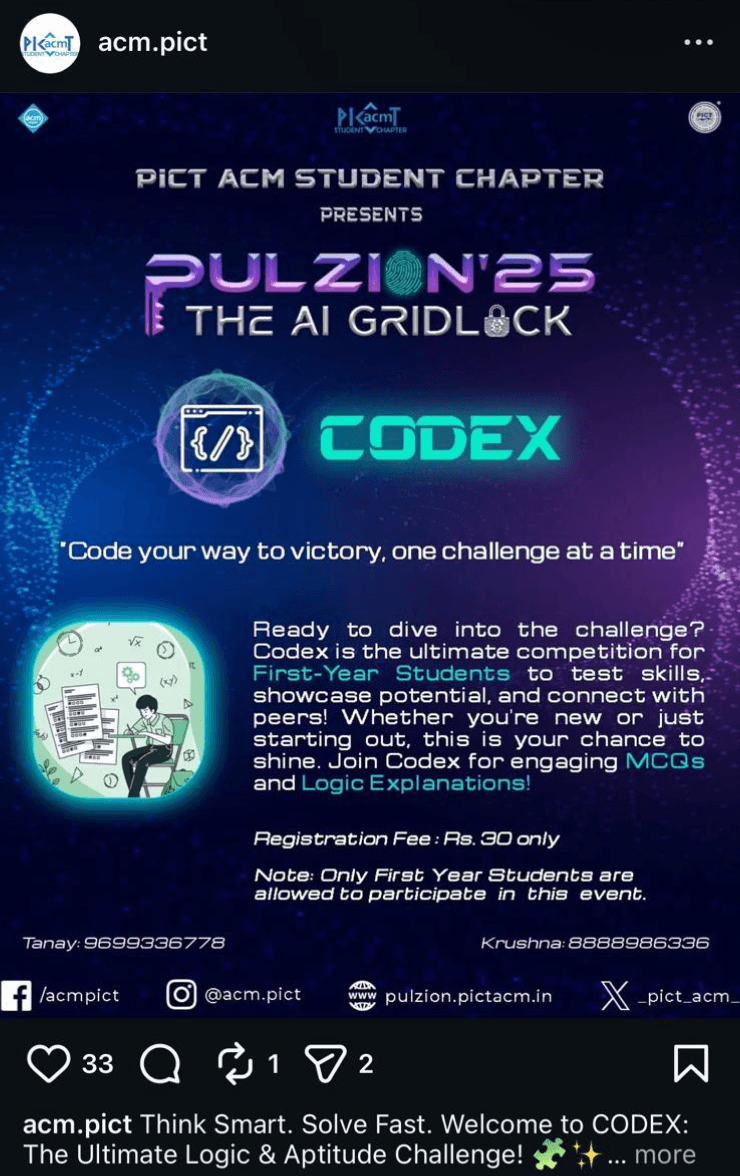
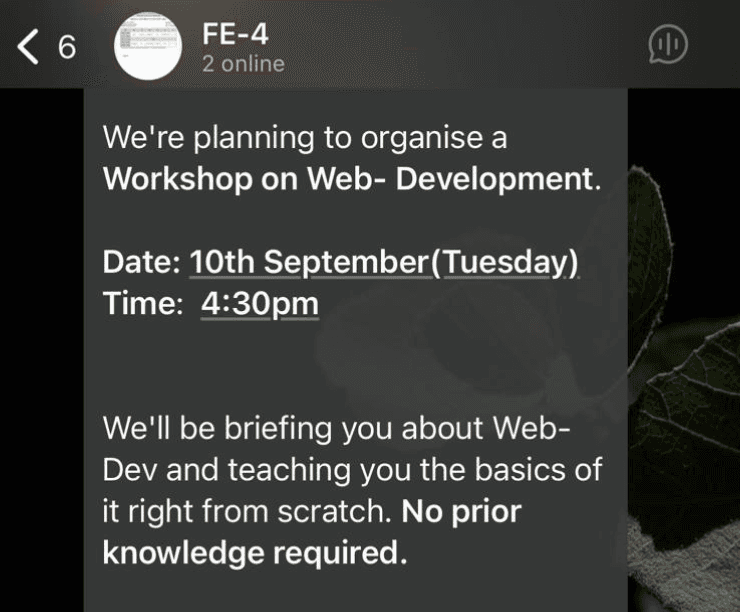
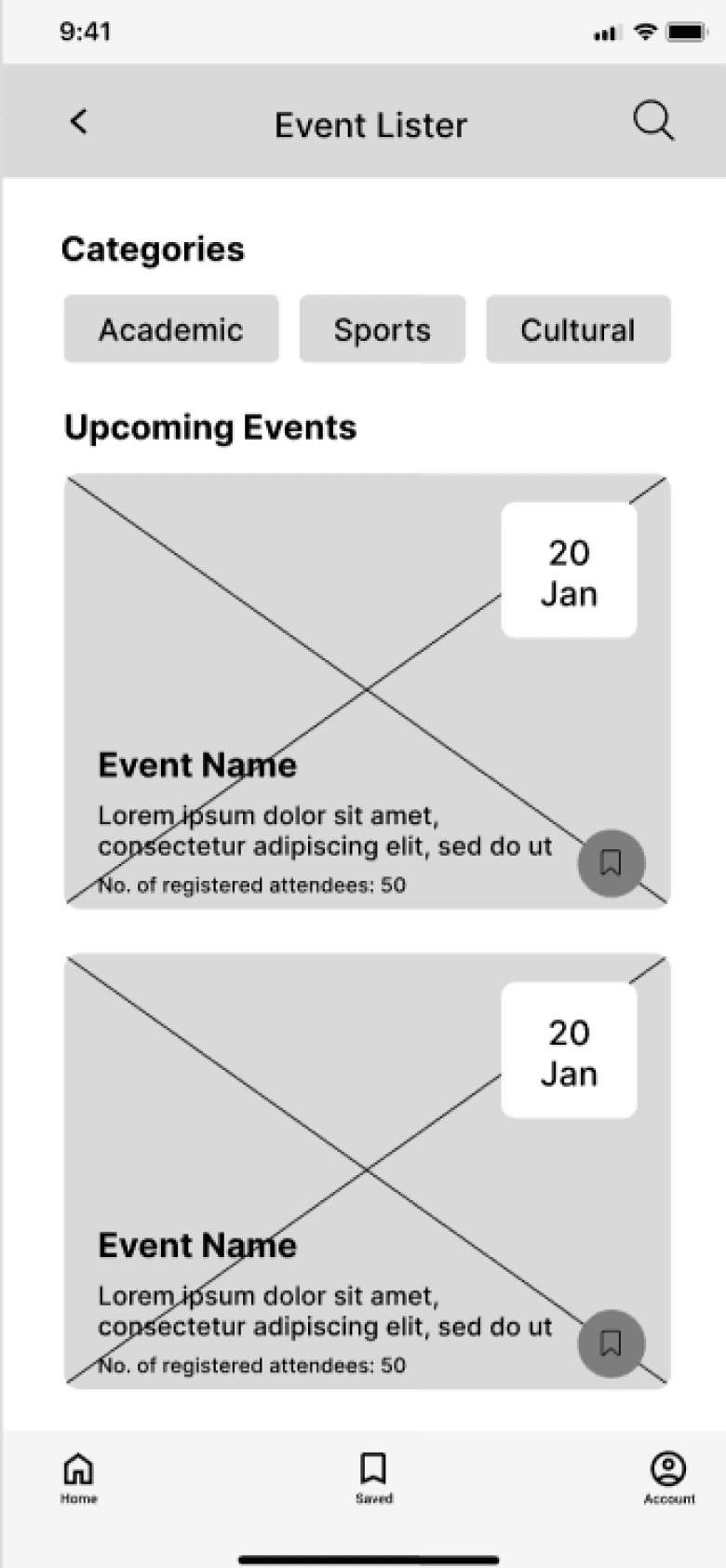
Key Observations:
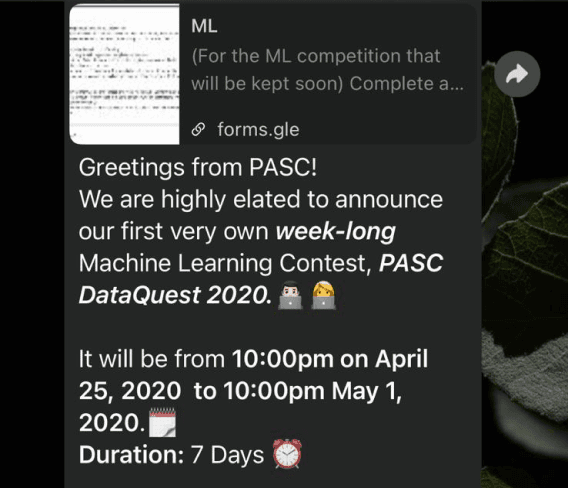
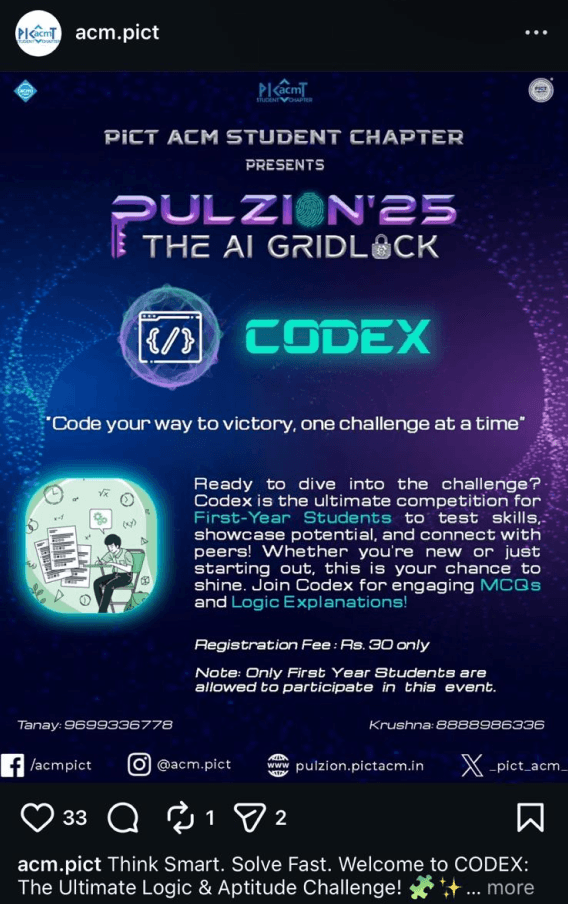
Event discovery is scattered across multiple channels, making tracking difficult.
Information is often incomplete or easy to miss, requiring extra effort to find details.
Awareness rarely leads to commitment due to forgetfulness and scheduling conflicts.
Students rely on peer validation to decide if an event is worth attending.
Ecosystem Review
The interviews helped draw the following two personas:
User Interviews
Alex

Age
25
Occupation
Student
Bio
A graduate or international student navigating academics, networking, and career preparation. Actively interested in campus opportunities but has limited time and mental bandwidth to evaluate every event.
Goals
•
Attend events that provide real value (networking, learning, exposure).
•
Avoid missing events they’ve already shown interest in.
•
Balance academics and extracurriculars without stress.
Behavior
•
Discovers events via WhatsApp groups, posters, Instagram, and peers.
•
Seeks validation from seniors or friends before committing.
•
Saves events mentally but forgets without reminders.
•
Hesitates when event details are unclear or schedules conflict.
Pain Points
•
Event information is scattered across multiple platforms.
•
Difficulty judging whether an event is “worth attending.”
•
Calendar clashes with exams or other commitments.
•
Cognitive overload from too many choices.
Event Attendee
This persona was derived from survey responses and interviews with graduate and international students who actively showed interest in campus events but reported missing them frequently. Patterns emerged around fragmented discovery channels, reliance on peer validation, and difficulty committing due to academic scheduling conflicts.
Lara

Age
27
Occupation
Student
Bio
A final-year student responsible for planning and executing campus events alongside academic responsibilities. Motivated to create successful events but constrained by time, tools, and reach.
Goals
•
Maximize event participation and engagement.
•
Accurately estimate attendance for planning and logistics.
•
Avoid scheduling conflicts with exams or other events.
Behavior
•
Promotes events through posters, social media, and word of mouth.
•
Tracks registrations manually or across multiple tools.
•
Struggles to monitor attendance in real time during events.
•
Adjusts planning reactively rather than proactively.
Pain Points
•
No centralized system for promotion and attendance tracking.
•
Uncertainty around expected turnout.
•
Late discovery of scheduling conflicts.
•
Limited visibility into participant engagement.
Event Organizer
This persona was shaped through interviews with final-year students responsible for organizing campus events. These students consistently described challenges around promotion reach, attendance estimation, and real-time tracking on the event day. Their need for efficiency, visibility, and coordination directly informed the organizer persona’s behaviors and priorities.
Surveys
Target Age Group
19-30 years
Number of responses
34
Shows scattered way of event publicity.
“How do you typically find out about events happening on campus?”
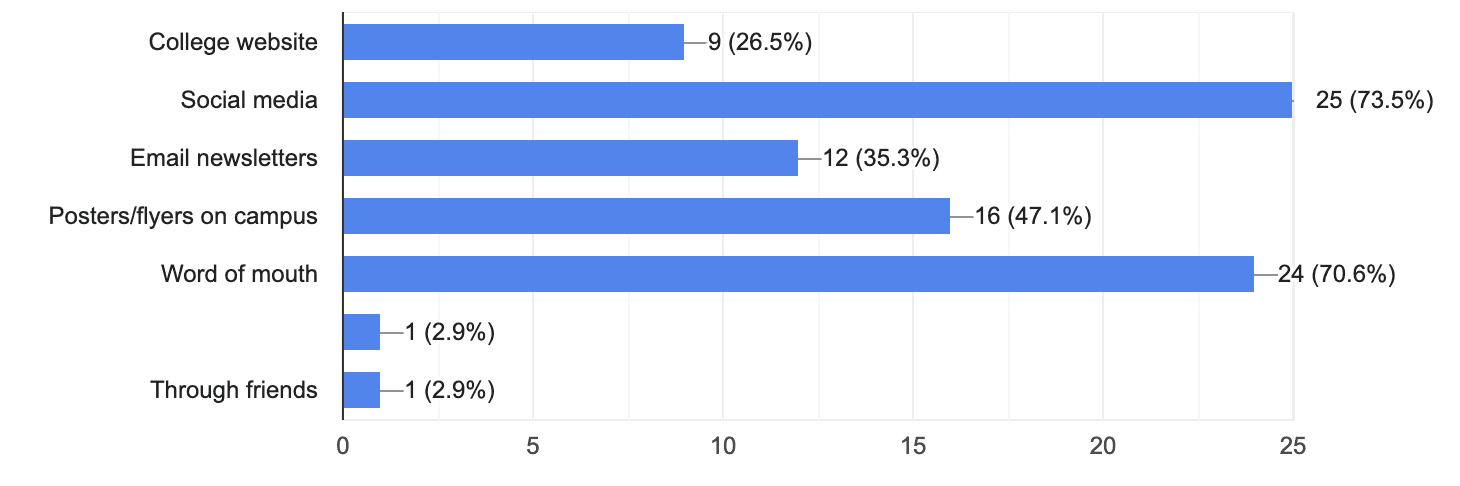
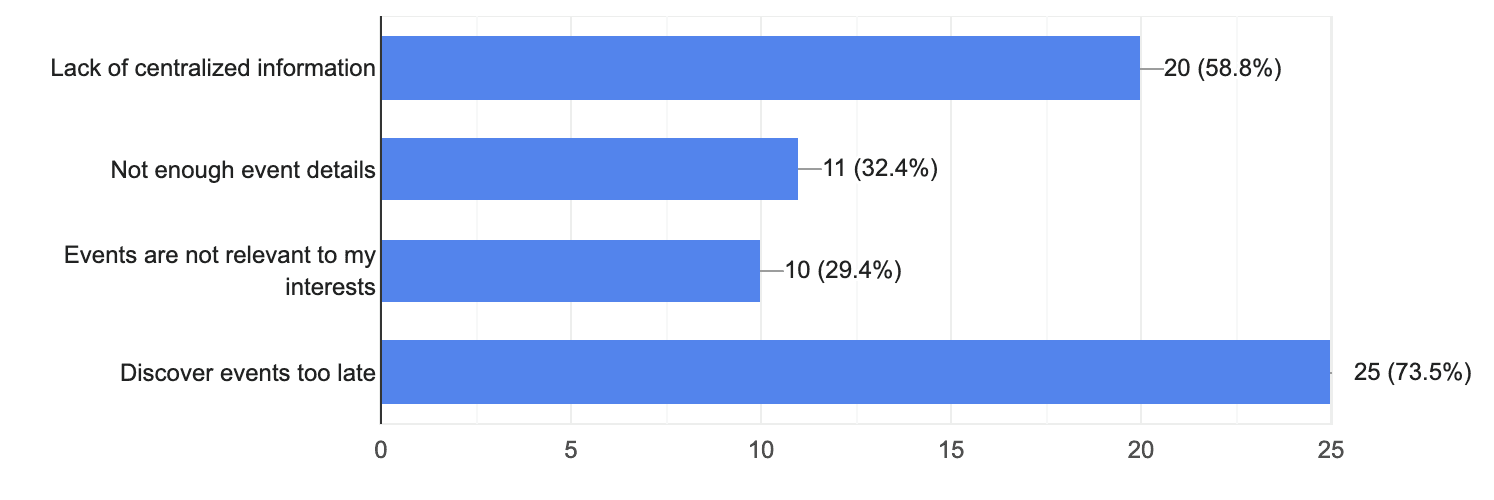
Reveals barriers in accessing events
that match student interests.
“What challenges do you face when trying to find events that interest you?”
Reveals decision-making criteria.
“What factors influence your decision to attend an event you discover?”
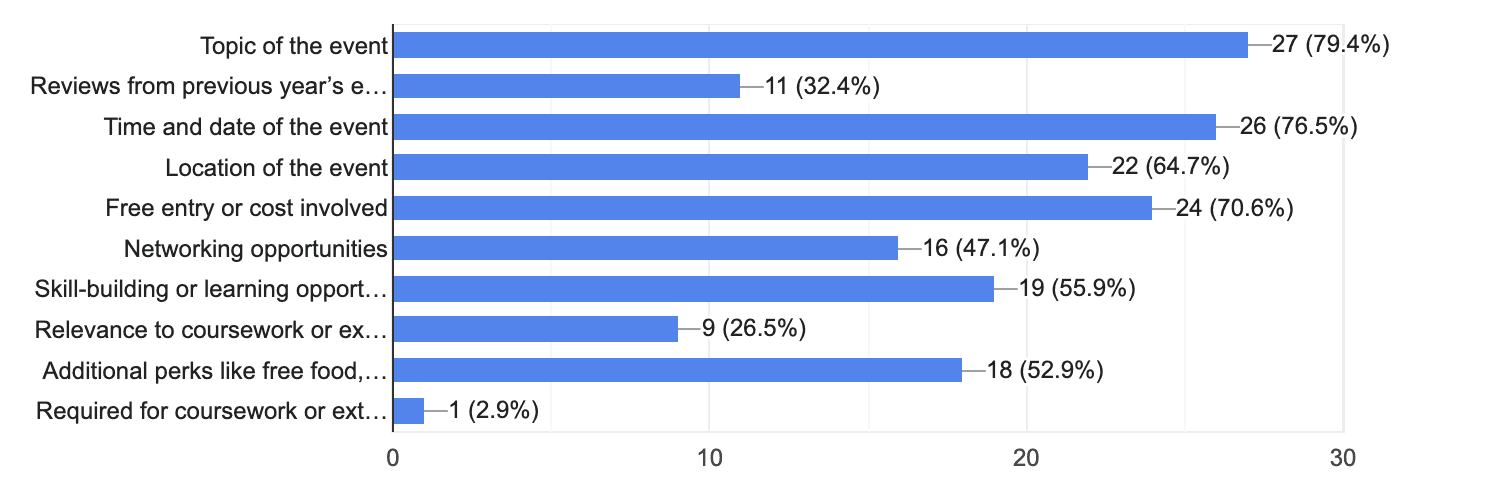
“What additional information would you like to see included in event listings?”
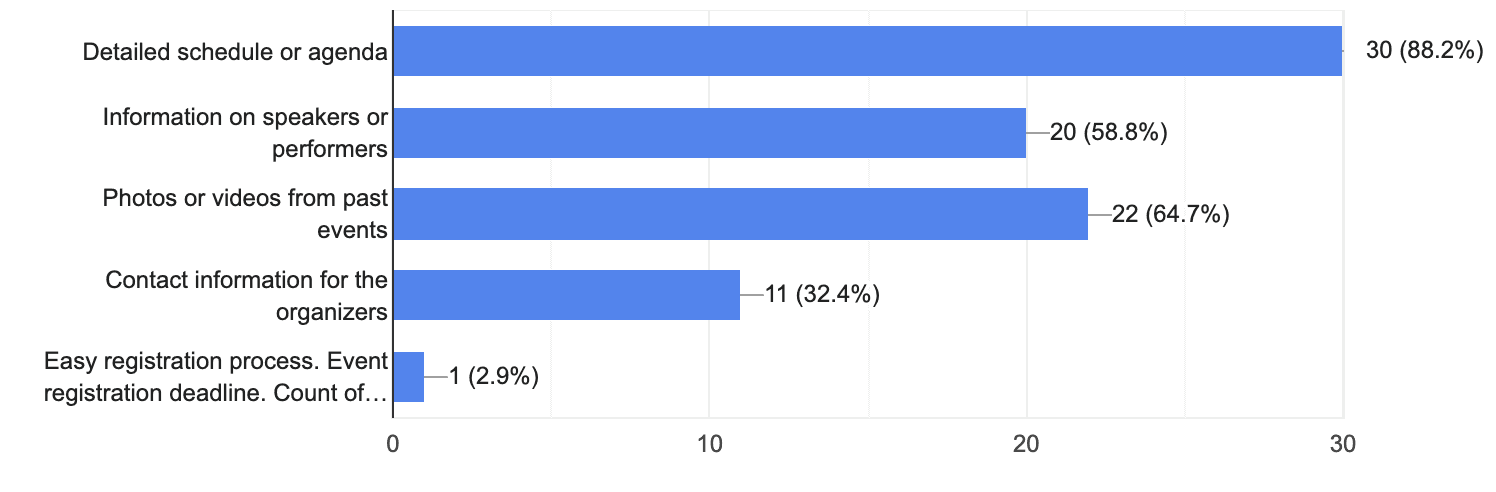
Reveals gaps in the details currently provided about events.
The goal of this research was to understand:
How students currently discover and decide to attend campus events
Why do students miss events they are interested in
How organizers manage promotion, attendance, and scheduling
Where breakdowns occur across the event lifecycle
RESEARCH
METHODS
Online survey
34 students
(aged 19–27)
Conducted to identify broad patterns in discovery, attendance behavior, and missed events
User Interviews
with event attendees
Conducted to understand decision-making, hesitation, and post-event behavior.
User Interviews
with event organizers
Conducted to uncover operational and planning challenges.
Ecosystem Review
Reviewed existing campus event discovery methods (posters, WhatsApp groups, Instagram, word-of-mouth).
WHY THIS MATTERS?
Missed events = Lost networking and learning opportunities.

Organizers lose turnout due to fragmented promotion.

Better discovery and scheduling drive higher participation.

These issues reduce participation and weaken the networking value of college events.
Students miss valuable events due to fragmented discovery, poor reminders, and schedule conflicts.
Event information is often insufficient to confidently decide whether an event is worth attending.
PRIMARY PROBLEMS
Organizers struggle to track attendance and manage event-day logistics.
Lack of a centralized calendar causes event overlaps and poor planning.
SECONDARY PROBLEMS
?
?
?
How might we help students easily discover, remember, and connect through college events, while giving organizers better tools to manage them?

Team
UX Researcher & Designer
Timeline
3-4 weeks
Users
College students (attendees) & student organizers
Event Quest serves as a comprehensive platform where students can browse and register for events, get reminders, and network with peers. Organizers can create events, manage attendance, and avoid clashes through a shared calendar.
Event Quest
FINAL SOLUTIONS
(Showcased key screens)
Organizer Experience
Attendance Tracking
Real-time attendee tracking and QR-based check-in give organizers visibility and control on the event day.
Attendee Experience
Event Discovery & Registration
The event detail page prioritizes essential information and immediate registration to reduce hesitation and support commitment.
Calendar & Reminders
Events are synced with academic schedules to help students manage conflicts and reduce missed events.
Event Quest
Timeline
3-4 weeks
Users
College students (attendees) & student organizers
Team
UX Researcher & Designer
How might we help students easily discover, remember, and connect through college events, while giving organizers better tools to manage them?
Event Quest serves as a comprehensive platform where students can browse and register for events, get reminders, and network with peers. Organizers can create events, manage attendance, and avoid clashes through a shared calendar.
Primary Problems
Students miss valuable events due to fragmented discovery, poor reminders, and schedule conflicts.
Event information is often insufficient to confidently decide whether an event is worth attending.
Secondary Problems
Organizers struggle to track attendance and manage event-day logistics.
Lack of a centralized calendar causes event overlaps and poor planning.
Why This Matters?
Missed events =
Lost networking and learning opportunities.
Organizers lose turnout due to fragmented promotion.

Better discovery and scheduling drive higher participation.

RESEARCH METHODS
The goal of this research was to understand:
How students currently discover and decide to attend campus events
Why do students miss events they are interested in
How organizers manage promotion, attendance, and scheduling
Where breakdowns occur across the event lifecycle
Online survey
34 students
(aged 19–27)
Conducted to identify broad patterns in discovery, attendance behavior, and missed events
User Interviews
with event attendees
Conducted to understand decision-making, hesitation, and post-event behavior.
User Interviews
with event organizers
Conducted to uncover operational and planning challenges.
Ecosystem Review
Reviewed existing campus event discovery methods (posters, WhatsApp, Instagram, word-of-mouth).
Surveys
Target Age Group
19-30 years
Number of responses
34
Shows scattered way of event publicity.
“How do you typically find out about events happening on campus?”
Reveals barriers in accessing events
that match student interests.
“What challenges do you face when trying to find events that interest you?”
Reveals decision-making criteria.
“What factors influence your decision to attend an event you discover?”
“What additional information would you like to see included in event listings?”
Reveals gaps in the details currently provided about events.
User Interviews
The interviews helped draw the following two personas:
Event Attendee
This persona was derived from survey responses and interviews with graduate and international students who actively showed interest in campus events but reported missing them frequently. Patterns emerged around fragmented discovery channels, reliance on peer validation, and difficulty committing due to academic scheduling conflicts.
Alex

Age
25
Occupation
Student
Bio
A graduate or international student navigating academics, networking, and career preparation. Actively interested in campus opportunities but has limited time and mental bandwidth to evaluate every event.
Goals
•
Attend events that provide real value (networking, learning, exposure).
•
Avoid missing events they’ve already shown interest in.
•
Balance academics and extracurriculars without stress.
Behavior
•
Discovers events via WhatsApp groups, posters, Instagram, and peers.
•
Seeks validation from seniors or friends before committing.
•
Saves events mentally but forgets without reminders.
•
Hesitates when event details are unclear or schedules conflict.
Pain Points
•
Event information is scattered across multiple platforms.
•
Difficulty judging whether an event is “worth attending.”
•
Calendar clashes with exams or other commitments.
•
Cognitive overload from too many choices.
Event Organizer
This persona was shaped through interviews with final-year students responsible for organizing campus events. These students consistently described challenges around promotion reach, attendance estimation, and real-time tracking on the event day. Their need for efficiency, visibility, and coordination directly informed the organizer persona’s behaviors and priorities.
Lara
Age
27
Occupation
Student
Bio
A final-year student responsible for planning and executing campus events alongside academic responsibilities. Motivated to create successful events but constrained by time, tools, and reach.
Goals
•
Maximize event participation and engagement.
•
Accurately estimate attendance for planning and logistics.
•
Avoid scheduling conflicts with exams or other events.
Behavior
•
Promotes events through posters, social media, and word of mouth.
•
Tracks registrations manually or across multiple tools.
•
Struggles to monitor attendance in real time during events.
•
Adjusts planning reactively rather than proactively.
Pain Points
•
No centralized system for promotion and attendance tracking.
•
Uncertainty around expected turnout.
•
Late discovery of scheduling conflicts.
•
Limited visibility into participant engagement.
Ecosystem Review
Key Observations:
Event discovery is scattered across multiple channels, making tracking difficult.
Information is often incomplete or easy to miss, requiring extra effort to find details.
Awareness rarely leads to commitment due to forgetfulness and scheduling conflicts.
Students rely on peer validation to decide if an event is worth attending.

DESIGN PRINCIPLES
Each design principle directly addresses recurring breakdowns observed during research:
Fragmented Discovery, Low Follow-through, and High Cognitive Load.
Bring discovery, reminders, and scheduling into one place.
Centralization over fragmentation
Design for follow-through, not just exploration.
Commitment over browsing
Reduce cognitive load through clear information and feedback.
Clarity over
complexity
How Research Informed the Information Architecture
Insight
IA Decision
Fragmented discovery
Low follow-through
Cognitive overload
Discovery + Calendar in primary nav
Registration embedded in event pages
Secondary features grouped
Conflicting user needs
Separate attendee & organizer flows
For Attendee
Saved Events
List of saved events
My Tokens
List of earned tokens
List of Registered Events
Registered Events
E-pass
Notify button
E-pass
Accounts
Personal
Information
My Calendar
Synced-up Calendar
Notes List
Create Note
Notes
List of people connected with at an event.
Message
Event Connections
Date & Time
Location
Description
Organizers
Speakers
Reviews
Register Button
Event Details
Search
Events list
Home
Select Preferences
Login
Event discovery and calendar access were placed in primary navigation to address fragmented discovery.
Registration and reminders live within event pages to support follow-through.
Registered events, saved events, and tokens were grouped to reduce cognitive load.
For Organizer
Login
Home
List of events organized
Track Attendees Button
Add Events
Select Event Category
Accounts
Personal Information
Event Creation
Form
Track Attendees
List of attendees
Mark as Check-in Button
Calendar
Synced-up Calendar
Attendee and organizer paths were separated to align with different mental models.
Usability Testing Insights
After defining the information architecture, low-fidelity prototypes were created to validate navigation clarity and task flow before investing in visual design. The goal was to identify structural issues early on.
Participants were asked to complete key tasks using the low-fidelity prototype while verbalizing their thought process. Observations focused on hesitation, confusion, misclicks, and unmet expectations.
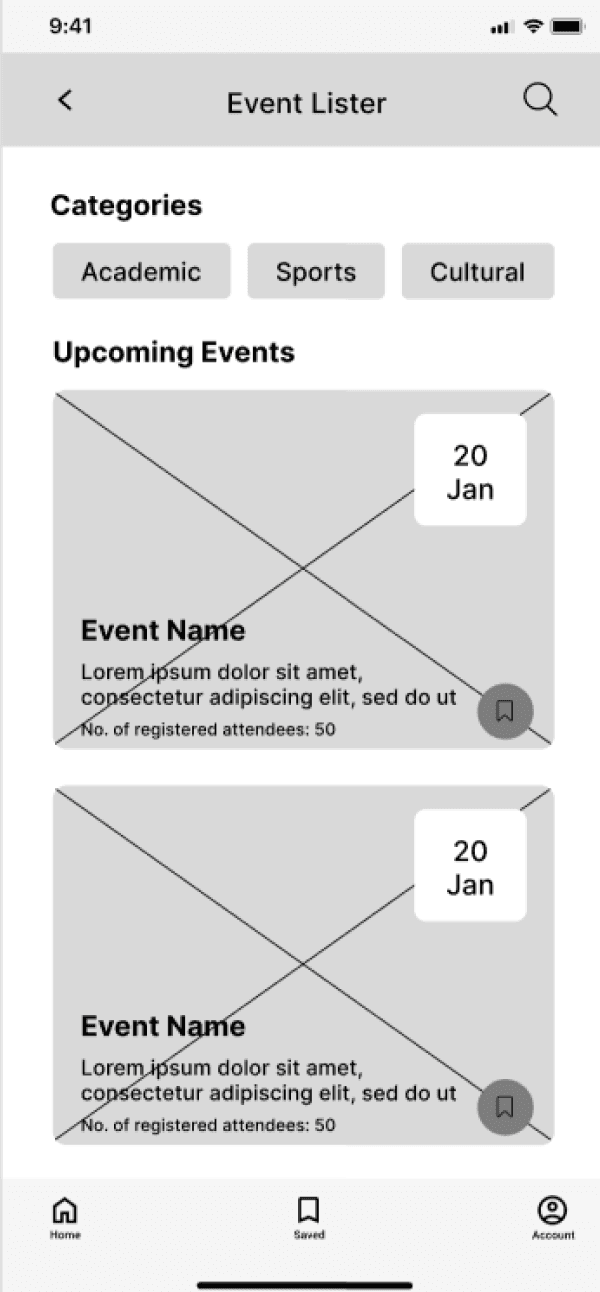
Users did not realize this section was scrollable.
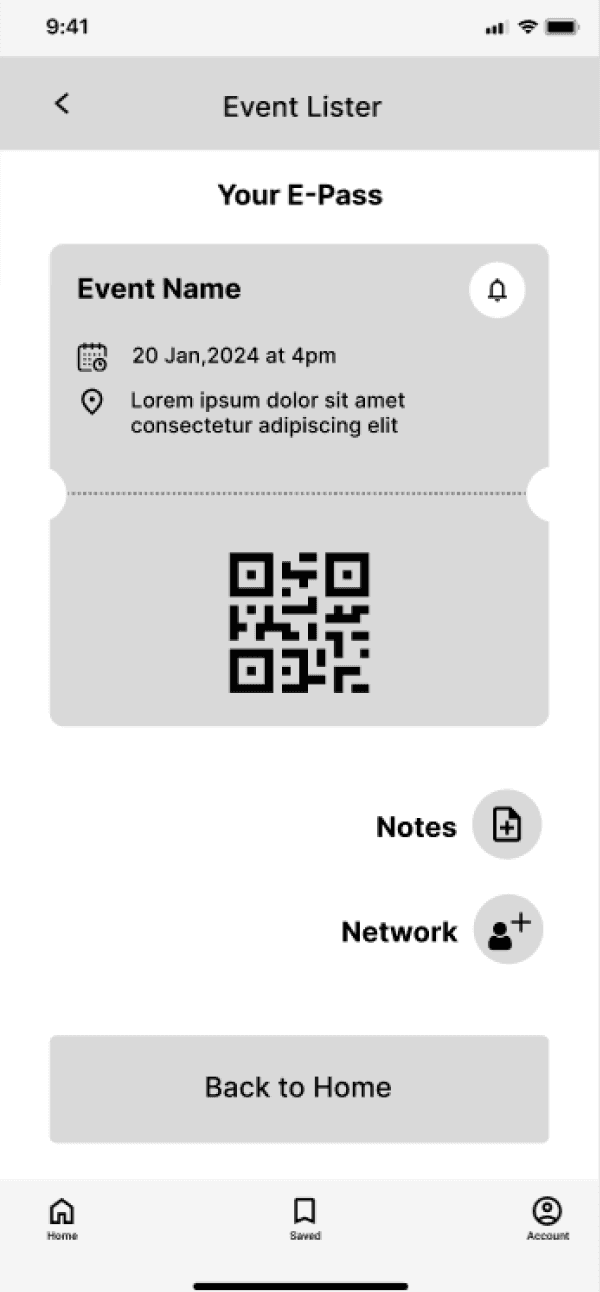
After leaving this page, accessing the notes and network section became difficult.
Saved in nav bar felt redundant since it already existed in accounts.
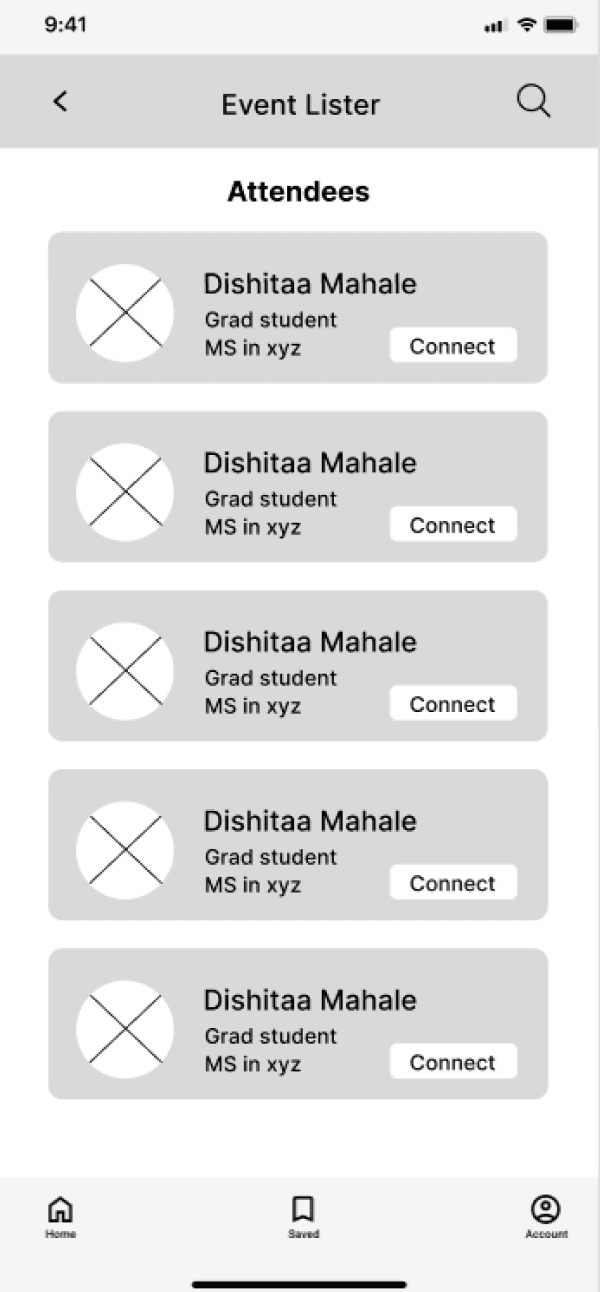
Users wanted to connect with the organizer but were unable to find a way to do so.
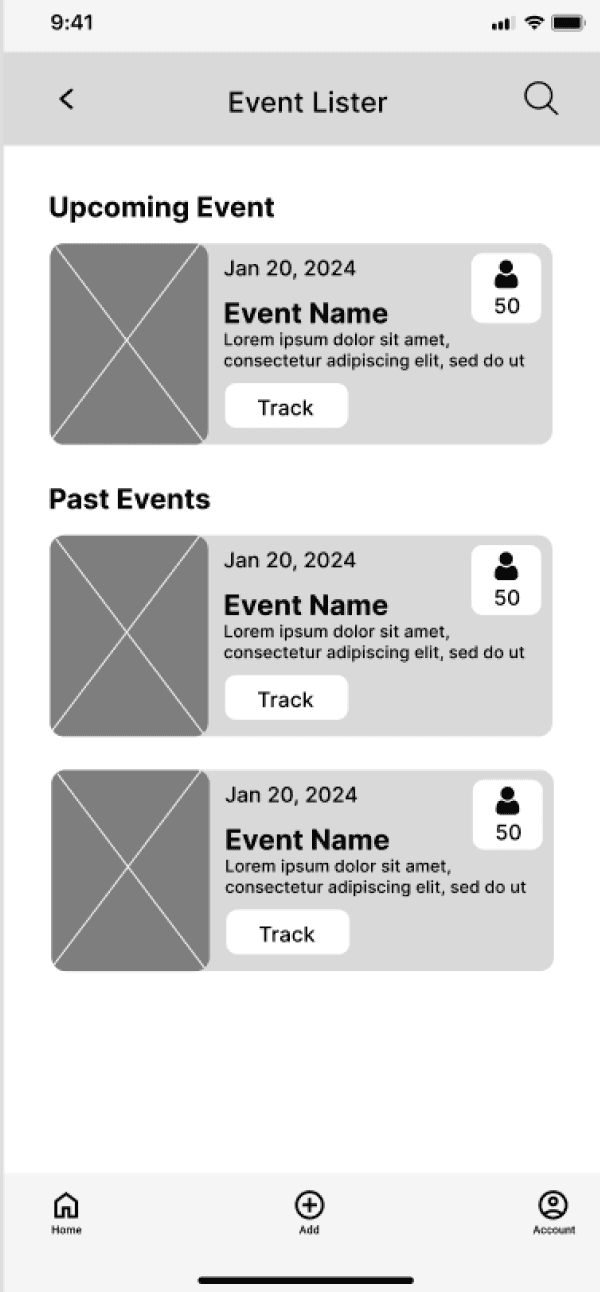
Organizers found it difficult to understand which event they were tracking attendees for.
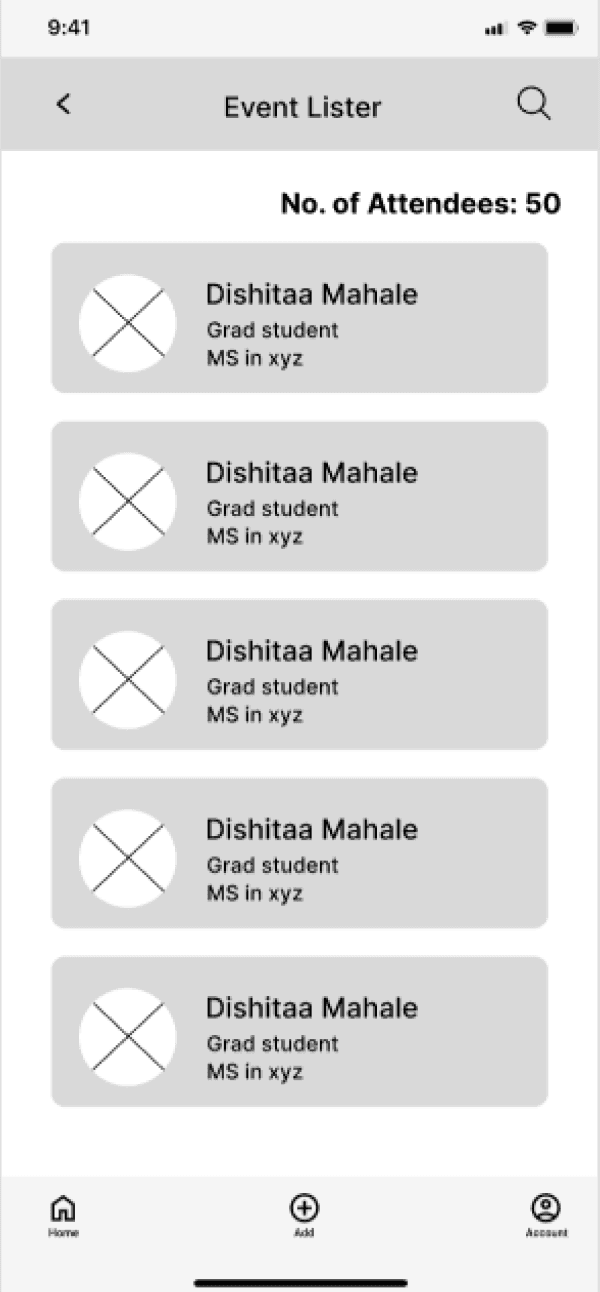
For organizers, having the same nav bar as attendees did not align with their needs.
Usability Issue
design Change
Scrollable sections went unnoticed
Redundant navigation items
Organizer confusion around tracking
Added scroll indicators and spacing cues
Consolidated saved content under Account
Event-level filtering and clearer labels
Missing post-event connections
Added a connection option after event check-in
These insights directly informed the final visual design and interaction decisions shown below:
IMPACT
Based on research and usability testing, this solution has the potential to:
Reduce time spent searching for relevant events
Lower missed events through reminders and scheduling visibility
Improve organizer planning through real-time attendance insights
Increase perceived value of events through built-in networking tools
REFLECTION
Usability testing reinforced solving structural issues before visual refinement, as hierarchy and navigation mattered more than aesthetics early.
Prioritize structure before polish
Creating distinct flows for attendees and organizers helped me balance competing needs and design a clearer, more focused system.
Designing for different user roles
I learned that surfacing too much at once increases cognitive load, and that prioritization and reduction lead to clearer decision-making.
Less information leads to better decisions
With more time, I would test this solution in a live campus setting and measure registration-to-attendance conversion to validate its impact.
Impact needs real-world validation
REFLECTION
Usability testing reinforced solving structural issues before visual refinement, as hierarchy and navigation mattered more than aesthetics early.
Prioritize structure before polish
Creating distinct flows for attendees and organizers helped me balance competing needs and design a clearer, more focused system.
Designing for different user roles
I learned that surfacing too much at once increases cognitive load, and that prioritization and reduction lead to clearer decision-making.
Less information leads to better decisions
With more time, I would test this solution in a live campus setting and measure registration-to-attendance conversion to validate its impact.
Impact needs real-world validation
REFLECTION
Usability testing reinforced solving structural issues before visual refinement, as hierarchy and navigation mattered more than aesthetics early.
Prioritize structure before polish
Creating distinct flows for attendees and organizers helped me balance competing needs and design a clearer, more focused system.
Designing for different user roles
I learned that surfacing too much at once increases cognitive load, and that prioritization and reduction lead to clearer decision-making.
Less information leads to better decisions
With more time, I would test this solution in a live campus setting and measure registration-to-attendance conversion to validate its impact.
Impact needs real-world validation
Impact
Based on research and usability testing, this solution has the potential to:
Reduce time spent searching for relevant events
Lower missed events through reminders and scheduling visibility
Improve organizer planning through real-time attendance insights
Increase perceived value of events through built-in networking tools
Organizer Experience
Event Discovery & Registration
The event detail page prioritizes essential information and immediate registration to reduce hesitation and support commitment.
Calendar & Reminders
Events are synced with academic schedules to help students manage conflicts and reduce missed events.
Attendance Tracking
Real-time attendee tracking and QR-based check-in give organizers visibility and control on the event day.
FINAL SOLUTION
(Showcased key screens)
Attendee Experience
Scrollable sections went unnoticed
Redundant navigation items
Organizer confusion around tracking
Missing post-event connections
Added visual scroll indicators and spacing cues
Consolidated saved content under Accounts
Introduced event-level filtering and clearer labels
Added a connection option after event check-in
Usability Issue
Design Change
These insights directly informed the final visual design and interaction decisions shown below.
After defining the information architecture, low-fidelity prototypes were created to validate navigation clarity and task flow before investing in visual design. The goal was to identify structural issues early on.
Participants were asked to complete key tasks using the low-fidelity prototype while verbalizing their thought process. Observations focused on hesitation, confusion, misclicks, and unmet expectations.
Usability Testing Insights
Users wanted to connect with the organizer but were unable to find a way to do so.
For organizers, having the same nav bar as attendees did not align with their needs.
Organizers found it difficult to understand which event they were tracking attendees for.
Users did not realize this section was scrollable.
After leaving this page, accessing the notes and network section became difficult.
Saved in nav bar felt redundant since it already existed in accounts.
For Organizer
Login
Home
Track Attendees
Add Events
Event Creation Form
Calendar
Accounts
List of events organized
Track Attendees Button
List of attendees
Mark as Check-in Button
Select Event Category
Personal Information
Synced-up Calendar
Attendee and organizer paths were separated to align with different mental models.
For Attendee
Select Preferences
Login
Home
Event Details
E-pass
Event Connections
Notes
My Calendar
Accounts
Registered Events
My Tokens
Saved Events
Search
List of events
Date & Time
Location
Description
Organizers
Speakers
Reviews
Register Button
List of people connected with at an event.
Message
E-pass
Notify button
Synced-up Calendar
Personal Information
List of Registered Events
List of earned tokens
List of saved events
Notes List
Create Note
Event discovery and calendar access were placed in primary navigation to address fragmented discovery.
Registration and reminders live within event pages to support follow-through.
Registered events, saved events, and tokens were grouped to reduce cognitive load.
Fragmented discovery
Low follow-through
Cognitive overload
Conflicting user needs
Discovery + Calendar in primary nav
Registration embedded in event pages
Secondary features grouped
Separate attendee & organizer flows
Research Insight
IA Decision
How Research Informed the Information Architecture
DESIGN PRINCIPLES
Each design principle directly addresses recurring breakdowns observed during research:
Fragmented Discovery, Low Follow-through, and High Cognitive Load.
Bring discovery, reminders, and scheduling into one place.
Centralization over fragmentation
Design for follow-through, not just exploration.
Commitment over browsing
Reduce cognitive load through clear information and feedback.
Clarity over
complexity
Key Observations:
Event discovery is scattered across multiple channels, making tracking difficult.
Information is often incomplete or easy to miss, requiring extra effort to find details.
Awareness rarely leads to commitment due to forgetfulness and scheduling conflicts.
Students rely on peer validation to decide if an event is worth attending.
Ecosystem Review
The interviews helped draw the following two personas:
User Interviews
Alex
Age
25
Occupation
Student
Bio
A graduate or international student navigating academics, networking, and career preparation. Actively interested in campus opportunities but has limited time and mental bandwidth to evaluate every event.
Goals
•
Attend events that provide real value (networking, learning, exposure).
•
Avoid missing events they’ve already shown interest in.
•
Balance academics and extracurriculars without stress.
Behavior
•
Discovers events via WhatsApp groups, posters, Instagram, and peers.
•
Seeks validation from seniors or friends before committing.
•
Saves events mentally but forgets without reminders.
•
Hesitates when event details are unclear or schedules conflict.
Pain Points
•
Event information is scattered across multiple platforms.
•
Difficulty judging whether an event is “worth attending.”
•
Calendar clashes with exams or other commitments.
•
Cognitive overload from too many choices.
Event Attendee
This persona was derived from survey responses and interviews with graduate and international students who actively showed interest in campus events but reported missing them frequently. Patterns emerged around fragmented discovery channels, reliance on peer validation, and difficulty committing due to academic scheduling conflicts.
Lara
Age
27
Occupation
Student
Bio
A final-year student responsible for planning and executing campus events alongside academic responsibilities. Motivated to create successful events but constrained by time, tools, and reach.
Goals
•
Maximize event participation and engagement.
•
Accurately estimate attendance for planning and logistics.
•
Avoid scheduling conflicts with exams or other events.
Behavior
•
Promotes events through posters, social media, and word of mouth.
•
Tracks registrations manually or across multiple tools.
•
Struggles to monitor attendance in real time during events.
•
Adjusts planning reactively rather than proactively.
Pain Points
•
No centralized system for promotion and attendance tracking.
•
Uncertainty around expected turnout.
•
Late discovery of scheduling conflicts.
•
Limited visibility into participant engagement.
Event Organizer
This persona was shaped through interviews with final-year students responsible for organizing campus events. These students consistently described challenges around promotion reach, attendance estimation, and real-time tracking on the event day. Their need for efficiency, visibility, and coordination directly informed the organizer persona’s behaviors and priorities.
The interviews helped draw the following two personas:
User Interviews
Alex
Age
25
Occupation
Student
Bio
A graduate or international student navigating academics, networking, and career preparation. Actively interested in campus opportunities but has limited time and mental bandwidth to evaluate every event.
Goals
•
Attend events that provide real value (networking, learning, exposure).
•
Avoid missing events they’ve already shown interest in.
•
Balance academics and extracurriculars without stress.
Behavior
•
Discovers events via WhatsApp groups, posters, Instagram, and peers.
•
Seeks validation from seniors or friends before committing.
•
Saves events mentally but forgets without reminders.
•
Hesitates when event details are unclear or schedules conflict.
Pain Points
•
Event information is scattered across multiple platforms.
•
Difficulty judging whether an event is “worth attending.”
•
Calendar clashes with exams or other commitments.
•
Cognitive overload from too many choices.
Event Attendee
This persona was derived from survey responses and interviews with graduate and international students who actively showed interest in campus events but reported missing them frequently. Patterns emerged around fragmented discovery channels, reliance on peer validation, and difficulty committing due to academic scheduling conflicts.
Lara
Age
27
Occupation
Student
Bio
A final-year student responsible for planning and executing campus events alongside academic responsibilities. Motivated to create successful events but constrained by time, tools, and reach.
Goals
•
Maximize event participation and engagement.
•
Accurately estimate attendance for planning and logistics.
•
Avoid scheduling conflicts with exams or other events.
Behavior
•
Promotes events through posters, social media, and word of mouth.
•
Tracks registrations manually or across multiple tools.
•
Struggles to monitor attendance in real time during events.
•
Adjusts planning reactively rather than proactively.
Pain Points
•
No centralized system for promotion and attendance tracking.
•
Uncertainty around expected turnout.
•
Late discovery of scheduling conflicts.
•
Limited visibility into participant engagement.
Event Organizer
This persona was shaped through interviews with final-year students responsible for organizing campus events. These students consistently described challenges around promotion reach, attendance estimation, and real-time tracking on the event day. Their need for efficiency, visibility, and coordination directly informed the organizer persona’s behaviors and priorities.
Surveys
Target Age Group
19-30 years
Number of responses
34
Shows scattered way of event publicity.
“How do you typically find out about events happening on campus?”
Reveals barriers in accessing events
that match student interests.
“What challenges do you face when trying to find events that interest you?”
Reveals decision-making criteria.
“What factors influence your decision to attend an event you discover?”
“What additional information would you like to see included in event listings?”
Reveals gaps in the details currently provided about events.
The goal of this research was to understand:
How students currently discover and decide to attend campus events
Why do students miss events they are interested in
How organizers manage promotion, attendance, and scheduling
Where breakdowns occur across the event lifecycle
RESEARCH
METHODS
Online survey
34 students
(aged 19–27)
Conducted to identify broad patterns in discovery, attendance behavior, and missed events
User Interviews
with event attendees
Conducted to understand decision-making, hesitation, and post-event behavior.
User Interviews
with event organizers
Conducted to uncover operational and planning challenges.
Ecosystem Review
Reviewed existing campus event discovery methods (posters, WhatsApp groups, Instagram, word-of-mouth).
WHY THIS MATTERS?
Missed events = Lost networking and learning opportunities.
Organizers lose turnout due to fragmented promotion.
Better discovery and scheduling drive higher participation.
WHY THIS MATTERS?
Missed events = Lost networking and learning opportunities.
Organizers lose turnout due to fragmented promotion.
Better discovery and scheduling drive higher participation.
These issues reduce participation and weaken the networking value of college events.
Students miss valuable events due to fragmented discovery, poor reminders, and schedule conflicts.
Event information is often insufficient to confidently decide whether an event is worth attending.
PRIMARY PROBLEMS
Organizers struggle to track attendance and manage event-day logistics.
Lack of a centralized calendar causes event overlaps and poor planning.
SECONDARY PROBLEMS
?
?
?
How might we help students easily discover, remember, and connect through college events, while giving organizers better tools to manage them?
Team
UX Researcher & Designer
Timeline
3-4 weeks
Users
College students (attendees) & student organizers
Event Quest serves as a comprehensive platform where students can browse and register for events, get reminders, and network with peers. Organizers can create events, manage attendance, and avoid clashes through a shared calendar.
Event Quest
REFLECTION
Usability testing reinforced solving structural issues before visual refinement, as hierarchy and navigation mattered more than aesthetics early.
Prioritize structure before polish
Creating distinct flows for attendees and organizers helped me balance competing needs and design a clearer, more focused system.
Designing for different user roles
I learned that surfacing too much at once increases cognitive load, and that prioritization and reduction lead to clearer decision-making.
Less information leads to better decisions
With more time, I would test this solution in a live campus setting and measure registration-to-attendance conversion to validate its impact.
Impact needs real-world validation
Impact
Based on research and usability testing, this solution has the potential to:
Reduce time spent searching for relevant events
Lower missed events through reminders and scheduling visibility
Improve organizer planning through real-time attendance insights
Increase perceived value of events through built-in networking tools
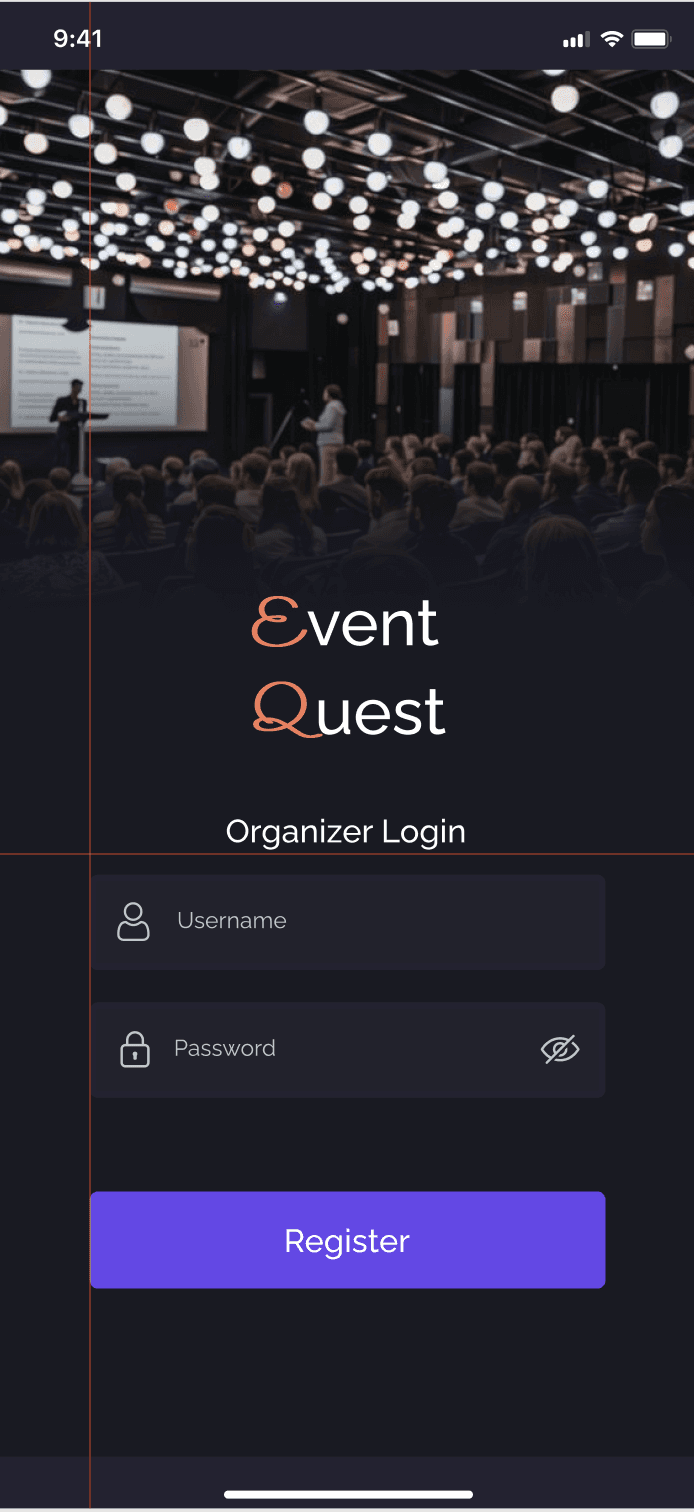
Organizer Experience
Event Discovery & Registration
The event detail page prioritizes essential information and immediate registration to reduce hesitation and support commitment.
Calendar & Reminders
Events are synced with academic schedules to help students manage conflicts and reduce missed events.
Attendance Tracking
Real-time attendee tracking and QR-based check-in give organizers visibility and control on the event day.
FINAL SOLUTION
(Showcased key screens)
Attendee Experience
Scrollable sections went unnoticed
Redundant navigation items
Organizer confusion around tracking
Missing post-event connections
Added visual scroll indicators and spacing cues
Consolidated saved content under Accounts
Introduced event-level filtering and clearer labels
Added a connection option after event check-in
Usability Issue
Design Change
These insights directly informed the final visual design and interaction decisions shown below.
After defining the information architecture, low-fidelity prototypes were created to validate navigation clarity and task flow before investing in visual design. The goal was to identify structural issues early on.
Participants were asked to complete key tasks using the low-fidelity prototype while verbalizing their thought process. Observations focused on hesitation, confusion, misclicks, and unmet expectations.
Usability Testing Insights
Users wanted to connect with the organizer but were unable to find a way to do so.
For organizers, having the same nav bar as attendees did not align with their needs.
Organizers found it difficult to understand which event they were tracking attendees for.
Users did not realize this section was scrollable.
After leaving this page, accessing the notes and network section became difficult.
Saved in nav bar felt redundant since it already existed in accounts.
For Organizer
Login
Home
Track Attendees
Add Events
Event Creation Form
Calendar
Accounts
List of events organized
Track Attendees Button
List of attendees
Mark as Check-in Button
Select Event Category
Personal Information
Synced-up Calendar
Attendee and organizer paths were separated to align with different mental models.
For Attendee
Select Preferences
Login
Home
Event Details
E-pass
Event Connections
Notes
My Calendar
Accounts
Registered Events
My Tokens
Saved Events
Search
List of events
Date & Time
Location
Description
Organizers
Speakers
Reviews
Register Button
List of people connected with at an event.
Message
E-pass
Notify button
Synced-up Calendar
Personal Information
List of Registered Events
List of earned tokens
List of saved events
Notes List
Create Note
Event discovery and calendar access were placed in primary navigation to address fragmented discovery.
Registration and reminders live within event pages to support follow-through.
Registered events, saved events, and tokens were grouped to reduce cognitive load.
Fragmented discovery
Low follow-through
Cognitive overload
Conflicting user needs
Discovery + Calendar in primary nav
Registration embedded in event pages
Secondary features grouped
Separate attendee & organizer flows
Research Insight
IA Decision
How Research Informed the Information Architecture
DESIGN PRINCIPLES
Each design principle directly addresses recurring breakdowns observed during research:
Fragmented Discovery, Low Follow-through, and High Cognitive Load.
Bring discovery, reminders, and scheduling into one place.
Centralization over fragmentation
Design for follow-through, not just exploration.
Commitment over browsing
Reduce cognitive load through clear information and feedback.
Clarity over
complexity
Key Observations:
Event discovery is scattered across multiple channels, making tracking difficult.
Information is often incomplete or easy to miss, requiring extra effort to find details.
Awareness rarely leads to commitment due to forgetfulness and scheduling conflicts.
Students rely on peer validation to decide if an event is worth attending.
Ecosystem Review
The interviews helped draw the following two personas:
User Interviews
Alex

Age
25
Occupation
Student
Bio
A graduate or international student navigating academics, networking, and career preparation. Actively interested in campus opportunities but has limited time and mental bandwidth to evaluate every event.
Goals
•
Attend events that provide real value (networking, learning, exposure).
•
Avoid missing events they’ve already shown interest in.
•
Balance academics and extracurriculars without stress.
Behavior
•
Discovers events via WhatsApp groups, posters, Instagram, and peers.
•
Seeks validation from seniors or friends before committing.
•
Saves events mentally but forgets without reminders.
•
Hesitates when event details are unclear or schedules conflict.
Pain Points
•
Event information is scattered across multiple platforms.
•
Difficulty judging whether an event is “worth attending.”
•
Calendar clashes with exams or other commitments.
•
Cognitive overload from too many choices.
Event Attendee
This persona was derived from survey responses and interviews with graduate and international students who actively showed interest in campus events but reported missing them frequently. Patterns emerged around fragmented discovery channels, reliance on peer validation, and difficulty committing due to academic scheduling conflicts.
Lara
Age
27
Occupation
Student
Bio
A final-year student responsible for planning and executing campus events alongside academic responsibilities. Motivated to create successful events but constrained by time, tools, and reach.
Goals
•
Maximize event participation and engagement.
•
Accurately estimate attendance for planning and logistics.
•
Avoid scheduling conflicts with exams or other events.
Behavior
•
Promotes events through posters, social media, and word of mouth.
•
Tracks registrations manually or across multiple tools.
•
Struggles to monitor attendance in real time during events.
•
Adjusts planning reactively rather than proactively.
Pain Points
•
No centralized system for promotion and attendance tracking.
•
Uncertainty around expected turnout.
•
Late discovery of scheduling conflicts.
•
Limited visibility into participant engagement.
Event Organizer
This persona was shaped through interviews with final-year students responsible for organizing campus events. These students consistently described challenges around promotion reach, attendance estimation, and real-time tracking on the event day. Their need for efficiency, visibility, and coordination directly informed the organizer persona’s behaviors and priorities.
Surveys
Target Age Group
19-30 years
Number of responses
34
Shows scattered way of event publicity.
“How do you typically find out about events happening on campus?”
Reveals barriers in accessing events
that match student interests.
“What challenges do you face when trying to find events that interest you?”
Reveals decision-making criteria.
“What factors influence your decision to attend an event you discover?”
“What additional information would you like to see included in event listings?”
Reveals gaps in the details currently provided about events.
The goal of this research was to understand:
How students currently discover and decide to attend campus events
Why do students miss events they are interested in
How organizers manage promotion, attendance, and scheduling
Where breakdowns occur across the event lifecycle
RESEARCH
METHODS
Online survey
34 students
(aged 19–27)
Conducted to identify broad patterns in discovery, attendance behavior, and missed events
User Interviews
with event attendees
Conducted to understand decision-making, hesitation, and post-event behavior.
User Interviews
with event organizers
Conducted to uncover operational and planning challenges.
Ecosystem Review
Reviewed existing campus event discovery methods (posters, WhatsApp groups, Instagram, word-of-mouth).
WHY THIS MATTERS?
Missed events = Lost networking and learning opportunities.
Organizers lose turnout due to fragmented promotion.

Better discovery and scheduling drive higher participation.

These issues reduce participation and weaken the networking value of college events.
Students miss valuable events due to fragmented discovery, poor reminders, and schedule conflicts.
Event information is often insufficient to confidently decide whether an event is worth attending.
PRIMARY PROBLEMS
Organizers struggle to track attendance and manage event-day logistics.
Lack of a centralized calendar causes event overlaps and poor planning.
SECONDARY PROBLEMS
?
?
?
How might we help students easily discover, remember, and connect through college events, while giving organizers better tools to manage them?

Team
UX Researcher & Designer
Timeline
3-4 weeks
Users
College students (attendees) & student organizers
Event Quest serves as a comprehensive platform where students can browse and register for events, get reminders, and network with peers. Organizers can create events, manage attendance, and avoid clashes through a shared calendar.
Event Quest